
Deepmark
Search your bookmarks by what's inside them, not the title
124 followers
Search your bookmarks by what's inside them, not the title
124 followers
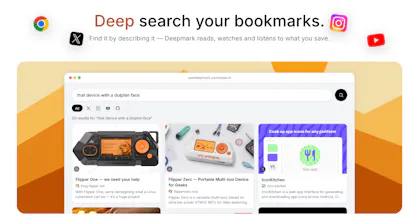
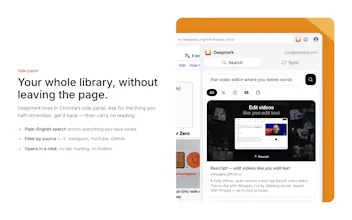
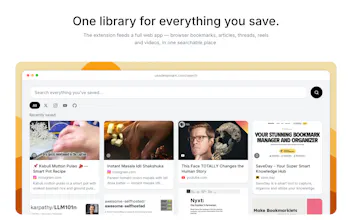
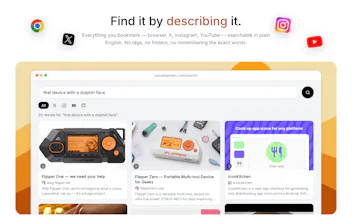
Your browser bookmarks, X bookmarks, Instagram saves and YouTube Watch Later, in one private library you can search in plain language. Deepmark reads every page, transcribes videos and reels, describes and OCRs frames, then embeds it all. 'The reel with the one-pan pasta trick' finds the reel even though nothing in it says pasta. A save is searchable in about 90 seconds; search over 10k items returns in under 100ms. Also a hosted MCP server: your AI agent can search your library too.

Free Options
Launch Team / Built With


Hey Product Hunt! I built Deepmark because I kept losing things I'd deliberately saved. Not forgotten: saved. A thread about pricing, a reel with a cooking trick, a talk someone linked me. Four apps, four lists, and none of them searchable together, because a bookmark is a URL and a title and nothing else.
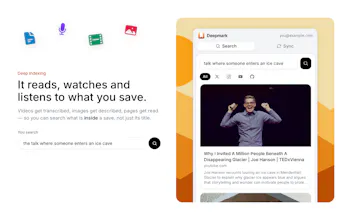
Deepmark indexes what's actually inside a save. Pages get fetched and read. Videos and reels get transcribed. A few frames per video get described and OCR'd, and every page gets a screenshot that gets described the way you'd remember seeing it. Then it's all embedded and searchable in plain language, so 'the reel with the one-pan pasta trick' finds the reel even though nothing in it is called pasta.
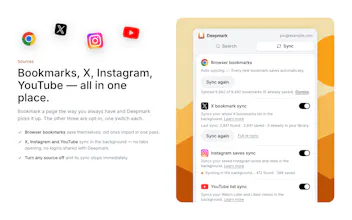
Sources: browser bookmarks (automatic), X bookmarks, Instagram saves, YouTube Watch Later and Liked. The social syncs run in your own browser as you, through each site's own endpoints. The extension never sees a password, and every source past browser bookmarks is off until you switch it on.
There's also a hosted MCP server with OAuth, so Claude or any MCP client can search your library ("what was that article I saved about pricing?").
The two numbers I actually trust: a saved reel is searchable in about 90 seconds, and search over a 10k-item library comes back in under 100ms.
Update, Oct 2026: there's now a free plan. Saving, sync and search are free and unlimited, with 50 items fully indexed. The paid plan ($10/mo or $84/yr) indexes everything.
Happy to go deep on any of it, the media extraction was the interesting part. What would you want it to do that it doesn't?
ngl my bookmarks folder is a graveyard, i save stuff to never see it again haha. does the search work on pages behind logins (like internal docs i bookmarked) or only public stuff?
@yelyzaveta_kibets Public pages only today. The extension sends the URL and title, but the fetching happens on the server without your cookies, so an internal doc arrives as a sign-in screen and that is what gets indexed. The bookmark is still there and still opens, the contents just are not searchable. Intranet addresses (localhost, 10.x, .internal) are not fetched at all.
The in-browser model does exist for X, Instagram and YouTube, where the sync runs as you through each site's own endpoints. Extending that to arbitrary logged-in pages is real work and is not built yet.
@shafuxyz Ah so it's per site rather than general, that makes way more sense than what I was picturing. If you added one more site to that list, which one gets asked for the most? I'd vote Notion, my whole brain lives in there
@yelyzaveta_kibets LinkedIn, so far. Saved posts there come up the most, and it fits the existing model, so it is the natural next one. Reddit saves is the other recurring ask. Neither is built yet.
One thing worth being precise about, since you asked about logins: "runs as you" covers collecting the list. The extension reads your saved items as you and ships the link plus the caption or tweet text it can already see. The deep pass (video transcript, frames, OCR) happens on our servers without your session, so it only works when the post itself is publicly accessible. A post from a private account still lands in your library and still opens, but it is searchable by caption and thumbnail only.
Notion is a different shape: not a saved-items feed but your own pages, and it has a proper API, so it would be a server-side connector rather than extension work. Vote noted, and "my whole brain lives in there" is the whole case for it.
@yelyzaveta_kibets Right now it's not there, but I agree it would be a good UX. Noted.
Wow! I have a teammate who absolutely needs this. Sending it to him now.
For me, I'd like the ability to query across LinkedIn and Facebook saved items too!
@tori_seidenstein Thank you for passing it along.
LinkedIn saved posts and Facebook saved items are the same shape as the syncs that exist: the extension runs in your own browser as you, through the site's own endpoints, and each site stays off until you switch it on. Nothing in that model has to change for those two, so it is build-and-test work rather than a wall.
Neither is built yet and I might try these before for next release. Send a note to support@usedeepmark.com and I will tell you when it ships.
woow ! the pile of stuff I saved once and never saw again is enormous, and just knowing something finally tackles that gives me real hope
@amine_aziz_alaoui Same here.
nice product! Will give it a try
to answer the "what would you want it to do" question - I screen a lot of early-stage stuff and my saved links skew heavily toward pitch decks (usually a PDF link or a Google Slides/Docs link shared directly, not a public webpage) and X threads that are only visible if you're logged in and following the person. both of those are exactly the kind of content that a "fetch and read the page" approach struggles with, since there's either no public HTML to fetch or the content sits behind auth the extension isn't supposed to touch. is that kind of source on the roadmap, or is it intentionally staying scoped to publicly fetchable pages plus the four social sources you already support
@galdayan Yes those are current limitations. Are you talking about X subscriber only threads? that wouldn't be possible I guess. Maybe a local native solution we might need to build. Reach out at support@usedeepmark.com with you requirements so we can keep in roadmap. Thanks!
@shafuxyz makes sense that it stays out of scope for now, auth-gated content is a whole different can of worms. will send a note to that email if I run into it enough to actually need it, appreciate the honest answer instead of a vague "on the roadmap"
@galdayan One correction to my own answer: public PDF and slide links are a different problem from auth-gated threads, and a much smaller one. That half of your use case is worth building. The logged-in-only half genuinely is not.
The "browser bookmarks (automatic)" part is what caught my eye - since it indexes everything you bookmark by default, is there a way to exclude specific bookmarks or folders from ever being fetched/embedded? Some bookmarks are things like internal work docs or personal stuff you'd want searchable locally but not sent through any pipeline at all, opt-out per source doesn't quite cover that.
@omri_ben_shoham1 Straight answer: not today. Browser bookmarks are all or nothing. The other three sources are off until you switch them on, but with the extension installed, a new browser bookmark is saved and indexed.
You are describing the right feature though, and it is not an architectural problem. The bookmark tree already gives us the folder path for every bookmark, so an exclusion list ("never touch anything under Work") is a filter in two places. A domain-level never-fetch list is the same shape.
Until that ships the honest options are keeping those bookmarks in a browser profile without the extension, or deleting the item afterwards.
Mail support@usedeepmark.com if you want it and I will tell you when the folder filter lands.
thanks for the detailed answer, that's a fair tradeoff and good to know it's not architecturally blocked. I'll hold off on adding those bookmarks until the folder filter ships, appreciate you following up.