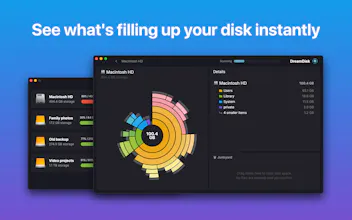
Is your Mac’s storage space running low, leaving you frustrated and endlessly looking for files to delete? DreamDisk is the solution you need! Simply drag and drop files into the junkyard for quick and hassle-free deletion.
No reviews yetBe the first to leave a review for DreamDisk
Maker
📌
One of the problems I keep facing with my Mac is running out of storage space. There are a few options out there to solve this problem, but none of them felt as fast, intuitive, smooth and satisfying as I'd like. For DreamDisk I've focused on just these things, and the result is pretty neat. I hope you'll like it!
@evgiz Congrats on the launch! Storage management is a pain to me as well. How is DreamDisk different from some mature tools, like Disk Cleaner One, etc?
Report
Maker
@lightfield Thank you, very excited to finally get it out there!
DreamDisk focuses much more on user experience and being an app that's easy & satisfying to use! Many of the tools that exist today feel quite heavy, and it becomes a chore to look through everything. My intent is to provide a much nicer experience, especially with the built-from-scratch visualizer. The juicy animations makes it pretty fun to explore and click around, really!
In terms of features DreamDisk does no automatic cleanup, but instead makes both discovery and deletion much easier to do yourself. And of course the scanning is super fast as well (thanks, Rust!).
Report
Low space is a problem I’ve been facing for a while, but I use CleanMyMac. How is DreamDisk different?
Report
Maker
@rai_rezende DreamDisk is not an automated cleaning tool, but a fast scanner/visualizer where you can choose yourself what to delete. Things like old videos or large app libraries might not be marked as "junk" by typical cleaning software, but are very easy to find & delete yourself with DreamDisk.
Report
@evgiz so what are the difference? Cleanmymac do the same 🧐
Report
Wow, this is especially interesting option for Mac users with smaller storage. Cool product!
Report
Maker
@tymzap Thanks, appreciate it! For small disks on MacBooks the scanning is particularly fast too, so you can often get a visual like shown above in less than a minute or so!
Report
Congrats on the launch! How do you decide which files to delete? Is there a smart algorithm that recommends the least important ones?
Report
Maker
@ihuzaifashoukat DreamDisk is meant to be an intuitive visualizer that makes it obvious what stuff is clogging up the drive. There's no automatic deletion/cleaning algorithm - the visualizer gives you the overview, and you can then choose yourself what's important to keep and what you don't really need.
Report
Very cool but extreeemely similar to the excellent DaisyDisk (daisydiskapp.com)
Perfect timing - my Mac's been hitting me with that dreaded storage warning all week. Been digging through endless folders trying to find what's eating up space. Quick q - does it catch those hidden cache files? VSCode and npm have been secretly hoarding GBs on my system.
Report
Maker
@thealisoneyo Yeah, hidden caches and app data is no problem! If you're a developer things like package manager caches, docker images, build folders etc that typically grow indefinitely are pretty easy to clean up.
Vozo AI — Video localization
Rayna UI - Free 500+ Components & UI kit
WildTrackAI: Discover Nature