Do you know what data your photos reveal about you? 🤔 Every image you share contains hidden metadata exposing your exact location, daily schedule, and technical details that can fingerprint your device. Whether you’re a photographer or privacy-conscious, you need to be aware of this risk. DropTidy lets you delete this data in your browser. 🔒 Total Privacy: Everything happens inside your browser. 🕵️ Deep Analysis: Find hidden privacy risks. ✨ Lossless: Keeps original quality and resolution.
No reviews yetBe the first to leave a review for DropTidy
Maker
📌
Do you check what hidden data is inside your photos before you share them online?
I built DropTidy because I realized that every photo I take has hidden information by default. I wanted to clean my photos regularly to stay safe, but I did not want to upload my private images to someone else's server to do it.
My approach was to build something 100% private. DropTidy works entirely inside your browser. This means your photos never leave your device and never touch a server.
It can find over 28 hidden risks, including your exact location and technical details that can fingerprint your phone. It removes this data while keeping your original image quality and colors perfect.
Did you know about this? Did you know there is a hidden layer in each photo regarding the device?
In practice, users differ on what they want removed: some want to nuke everything; others want to preserve attribution/copyright fields—how did you decide what to strip vs keep, and what’s your philosophy on “safe defaults” vs granular control?
Report
Maker
Right now, my philosophy is safe by default, so the tool basically wipes everything to make sure nothing leaks out by accident.
Since the goal is total privacy, starting with a fresh copy felt like the best starting point for the launch. I definitely want to add more granular control later so creators can keep things like copyright info if they want to.
Thanks for the insight! Which fields do you personally think are the most important to keep @curiouskitty? 👀
Report
@curiouskitty@tomdra This is an interesting topic to discuss. I personally would like to keep the information on the location and the date of the photo to use it as a way of reminding.
Report
Maker
@curiouskitty I started with a full wipe for maximum privacy, but I will definitely see if I can add a way to keep those specific details in a future update. Thanks for the idea @yuanyuan_zhang0104! 🙌
Report
💎 Pixel perfection
Congrats on the launch! Love the browser-only approach, keeping photos local while stripping metadata feels like the right default for privacy. How transparent is the cleanup process for users, can they see exactly which metadata fields were removed before exporting?
Report
Maker
Great question, @vik_sh! I really didnt want it to be a black box.
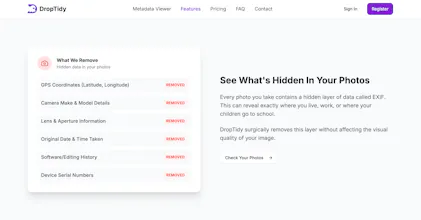
But to specifically answer your question you are able to see which groupped metadata where deleted from the image before you download the cleaned version. Just like in the image below:
Report
The 'Zero Upload' approach is the only way I’d trust a tool with my personal photos. Knowing that the scrubbing happens 100% in the browser (client-side) is a huge selling point for privacy-conscious users. Does DropTidy support HEIC files from iPhones or RAW files from professional cameras, or is it primarily focused on JPEGs and PNGs? Supporting mobile-native formats would make this an everyday tool for me.
Report
Maker
Thanks so much @yuanyuan_zhang0104! I completely agree. If its not 100% local, its hard to truly trust.
I actually already built in HEIC support since I knew it was a must-have for iPhone users from the beginning using heic2any since browsers dont support heic natively.
Professional RAW files are a bit more difficult to handle in the browser, but Im definitely looking into it next! Give it a try with some of your mobile photos and let me know how it goes! 😉
Report
💡 Bright idea
Looks solid, @tomdra Does this also remove embedded metadata around AI created images?
Report
Maker
Thats a great question and I was actually hoping someone would ask this. This feature is coming to DropTidy very soon. As we know, 2026 is the year where almost all AI-generated images will be flagged on the internet as AI.
Right now the tool handles all the standard metadata but removing the embedded AI data would be the next step. I am currently working on it and would be bringing it to public very soon @kenyarmosh! 😉
Report
@tomdra Nice. Very smart move and congrats on a successful launch.
Report
Maker
Thanks, @kenyarmosh! Appreciate the support. I really think the AI-generated labels are going to catch a lot of people off guard soon, so I want to make sure DropTidy is ready for it. Just added you on LinkedIn and sent you a message there. 😄
Report
@tomdra Agreed. I could argue you should spin off a version just focused on the AI removal aspect.
Report
Maker
I will probably stick to keeping it all in one place for now, but a standalone version is a great idea for later.
Do you think people would actually prefer a separate app just for that @kenyarmosh?🤔
Report
@tomdra It will help you capture that demand more cleanly…messaging, SEO, etc.
Report
I have one further query regarding compatibility: do you plan to include .tiff files in a future update, alongside the RAW support you are currently investigating?
Report
Maker
Thats a great point @sphnsx! I know .tiff is a staple for photographers and the publishing industry when it comes to high-quality raster graphics. Its definitely on my radar alongside RAW because its widely used for archival and high-end image manipulation.
Are you mainly using .tiffs for work or where else? I would love to know which specific metadata fields matter most for your workflow so I can prioritize them! 🤔
Report
lol I always assumed photos were just… photos. Didn’t really think about anything extra being attached to them. DropTidy made me realise there’s a lot more going on behind the scenes and it is simple enough that you don’t need to understand all the technical stuff to still protect yourself.
Report
Maker
I honestly felt the same way before I started this. Its pretty scary that a basic photo has your phones serial number or even the software you used to edit it just sitting there.
I really wanted to make it so you dont have to be a tech person to clear that stuff. Did you find anything weird in your own photos when you scanned them @hannah_krause1?






Product Hunt
Right now, my philosophy is safe by default, so the tool basically wipes everything to make sure nothing leaks out by accident.
Since the goal is total privacy, starting with a fresh copy felt like the best starting point for the launch. I definitely want to add more granular control later so creators can keep things like copyright info if they want to.
Thanks for the insight!
Which fields do you personally think are the most important to keep @curiouskitty? 👀
@curiouskitty @tomdra This is an interesting topic to discuss. I personally would like to keep the information on the location and the date of the photo to use it as a way of reminding.
@curiouskitty I started with a full wipe for maximum privacy, but I will definitely see if I can add a way to keep those specific details in a future update. Thanks for the idea @yuanyuan_zhang0104! 🙌
Congrats on the launch! Love the browser-only approach, keeping photos local while stripping metadata feels like the right default for privacy. How transparent is the cleanup process for users, can they see exactly which metadata fields were removed before exporting?
Great question, @vik_sh! I really didnt want it to be a black box.
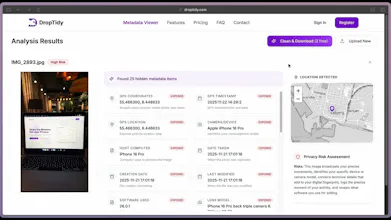
You can actually use the free analyzer here to see every single hidden field before you do anything: https://droptidy.com/photo-metadata-viewer.
But to specifically answer your question you are able to see which groupped metadata where deleted from the image before you download the cleaned version. Just like in the image below:
The 'Zero Upload' approach is the only way I’d trust a tool with my personal photos. Knowing that the scrubbing happens 100% in the browser (client-side) is a huge selling point for privacy-conscious users. Does DropTidy support HEIC files from iPhones or RAW files from professional cameras, or is it primarily focused on JPEGs and PNGs? Supporting mobile-native formats would make this an everyday tool for me.
Thanks so much @yuanyuan_zhang0104! I completely agree. If its not 100% local, its hard to truly trust.
I actually already built in HEIC support since I knew it was a must-have for iPhone users from the beginning using heic2any since browsers dont support heic natively.
Professional RAW files are a bit more difficult to handle in the browser, but Im definitely looking into it next! Give it a try with some of your mobile photos and let me know how it goes! 😉
Thats a great question and I was actually hoping someone would ask this. This feature is coming to DropTidy very soon. As we know, 2026 is the year where almost all AI-generated images will be flagged on the internet as AI.
Right now the tool handles all the standard metadata but removing the embedded AI data would be the next step. I am currently working on it and would be bringing it to public very soon @kenyarmosh! 😉
Thanks, @kenyarmosh! Appreciate the support. I really think the AI-generated labels are going to catch a lot of people off guard soon, so I want to make sure DropTidy is ready for it. Just added you on LinkedIn and sent you a message there. 😄
I will probably stick to keeping it all in one place for now, but a standalone version is a great idea for later.
Do you think people would actually prefer a separate app just for that @kenyarmosh?🤔
I have one further query regarding compatibility: do you plan to include .tiff files in a future update, alongside the RAW support you are currently investigating?
Thats a great point @sphnsx! I know .tiff is a staple for photographers and the publishing industry when it comes to high-quality raster graphics. Its definitely on my radar alongside RAW because its widely used for archival and high-end image manipulation.
Are you mainly using .tiffs for work or where else? I would love to know which specific metadata fields matter most for your workflow so I can prioritize them! 🤔
lol I always assumed photos were just… photos. Didn’t really think about anything extra being attached to them. DropTidy made me realise there’s a lot more going on behind the scenes and it is simple enough that you don’t need to understand all the technical stuff to still protect yourself.
I honestly felt the same way before I started this. Its pretty scary that a basic photo has your phones serial number or even the software you used to edit it just sitting there.
I really wanted to make it so you dont have to be a tech person to clear that stuff. Did you find anything weird in your own photos when you scanned them @hannah_krause1?