

Formula Foundry simplifies formula creation and management in Google Sheets and Microsoft Excel, with an AI assistant for generation and debugging. Key features: -Visual builder for IF, QUERY, XLOOKUP, VLOOKUP -AI assistant to generate or explain formulas -Automatic Excel ↔ Sheets translation -Reusable variables (e.g., @@TaxRate) -Formula snippet library -Rich editor with syntax highlighting Now with full native Excel support via Office Add-in. Free trial, no card required: formulafoundry.io






FF team here:
Were excited to launch Formula Foundry, an app that makes formula work simpler and more reliable in both Google Sheets and Microsoft Excel Cloud.
Spreadsheet formulas can slow down workflows: complex logic that's hard to build, errors that are tough to debug, and real headaches when migrating between Excel and Google Sheets or keeping values consistent across teams.
We built Formula Foundry to handle all that in one tool that's now available for Google Sheets and Excel.
Key features:
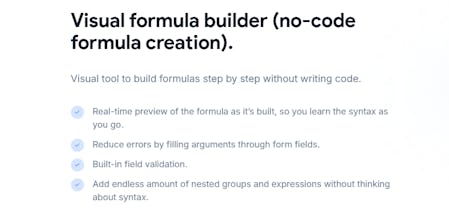
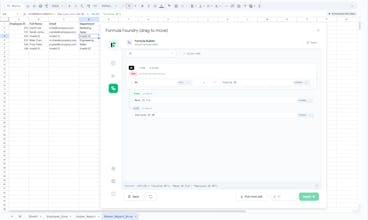
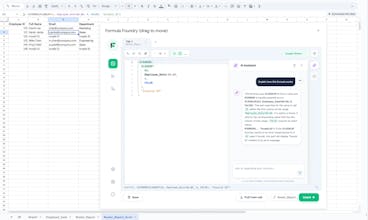
Visual builder: Point-and-click for IF, QUERY, XLOOKUP, VLOOKUP and nested logic with previews/validation
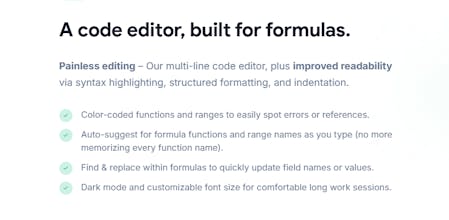
Rich editor: Syntax highlighting, auto-completion, bracket matching, smart formatting, bug detection
AI assistant: Generate formulas from plain English, explain existing ones, or get help debugging
Variables: Custom named values (e.g., TaxRate) for use in formulas across tabs, update once see change everywhere
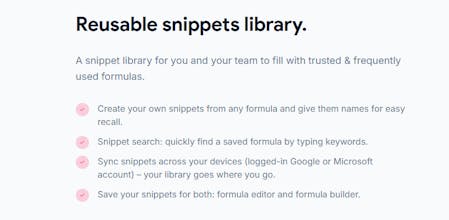
Snippets library: Save/search reusable trusted formulas
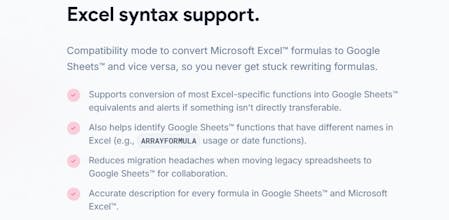
Excel ↔ Sheets translator: Handles function differences and alerts on limits
Perfect for analysts, finance teams, or anyone dealing with spreadsheets on a regular basis.
We offer a 14 day Free trial (no card required) and competitive pricing..
Get it here:
Main site: Formula Foundry
Google Workspace Marketplace
Microsoft Marketplace
We’d love feedback: what would improve your spreadsheet workflow?
Thanks for checking us out!
Formula Foundry team
Congrats on the launch, Formula Foundry!
So much of my work ends up living in spreadsheets — projections, scenario modeling, quick analyses — and this tool has made that work noticeably easier. The multiline editor, formula explanations, and reusable variables are real productivity boosters, not just nice-to-haves.
It’s built for people who actually use spreadsheets every day!
@megan_wells3 , thank you!
You really hit on the core of why we built the Variable Library.
In scenario modeling, the biggest risk is always hard-coding a value deep in a formula and forgetting to update it later. By using reusable variables (like a "global constant" in code), you can change one value and have it cascade across the whole model instantly. It’s about making the sheet "stateful" and organized rather than just a collection of static cells.
I'm especially glad the multiline editor is helping. I’ve always found it ironic that we write code in beautiful IDEs but we’re expected to build multi-million dollar projections in a single-line text box!
Good luck with those analyses - let me know if there are any specific "Scenario" features you’d like to see in the next build.
FF co-founder (and the person currently powered by 90% caffeine) here!
I’m the "technical nerd" behind the curtain who built the engine, the UI, and probably a few of the bugs you might find. Since I’ve been living in the code and the business logic simultaneously for months, there’s one thing I need to shout from the rooftops:
Formula Foundry is NOT just another AI wrapper!
Look, I love LLMs as much as the next dev, but if I see one more "ChatGPT-with-a-fresh-coat-of-paint" product, I might lose it. We actually built a real, living, breathing IDE for spreadsheets.
While we do have AI to help you out, the heart of the product is a custom-built logic engine. We’re talking a multi-line editor, a visual logic builder, and a cross-platform translator that I spent way too many late nights perfecting so you don't have to deal with "Formula Trauma" ever again.
A few things I’m particularly nerdy about:
The Parser: It doesn't just "guess" what you want; it understands the structure of your logic.
The Visual Builder: Mapping out nested IFs like a flowchart because, honestly, who can read 10 sets of parentheses?
The "One-Man Army" Build: I’ve touched every line of code and every business requirement. I built this because I wanted a tool that treated spreadsheets with the same respect we give to professional software development.
Being the solo dev on this means I’m the one answering your support tickets and fixing your bugs. I’ll be hanging out here all day to talk about the tech stack, the roadmap, or why we are still wrestling with single-line formula bars in 2026.
Ask me anything - I’m an open book!
I use Formula Foundry to keep my trading sheets from breaking. The debugger is the best part—it catches syntax errors instantly so I’m not losing money and patience hunting for a missing comma while the market is open.
It lets me write formulas across multiple lines and name my variables (helpful from a coding background) which makes my napkin risk math actually readable. It’s a solid tool too if you just want your Excel logic to work without the headache. Can see this being a huge boon across a wide range of industry applications. Good luck with the launch! Rooting for you guys!
@connor_mc Thank you for sharing how Formula Foundry is taking your workflow to the next level! We love to hear finance folks are enjoying the tool -- Please keep us posted on if you have any feedback on how we can improve for finance users!
Looks interesting! I have to use excel for work but I always drag my feet to start because it’s soooo time consuming for me as I tend to get stuck on some of the formulas and don’t know how resolve some of the errors. Excited to try this out!
@linnea_rosa , I think we’ve all been there - staring at a screen for an hour because of one misplaced comma. That "dragging your feet" feeling is exactly what we want to eliminate.
When I was building the Visual Builder, I focused specifically on the "getting stuck" part. Instead of you having to guess where the logic broke, our tool shows you the flow of the formula. If there's an error, it’s much easier to spot a broken link in a visual map than it is to find a needle in a haystack of text.
We really want to turn those "I don't know how to fix this" moments into "Oh, that’s where the error is!" moments. Give it a spin on your next project, and if you get stuck on a specific formula, just reach out - I’d love to help you debug it!
@pavanchaparla , huge thanks for being with us since the early days!
As a data analyst, you deal with the exact "fragility" we were trying to solve. That "don't touch it or it breaks" feeling is basically technical debt living inside a spreadsheet. It keeps people from optimizing their work because they're simply afraid of the cascade of errors.
I’m especially glad you mentioned the QUERY Builder. Writing SQL-like syntax inside a single Excel or Sheets cell is a recipe for a headache, so I spent a lot of time making sure that specific module could handle complex logic while keeping the syntax hidden.
Your insights during the beta were instrumental in helping us move away from "writing formulas" toward "engineering logic". Let’s keep killing off those "black box" formulas for good!
See you in the sheets!
Hey Product Hunt!
I’m Will, co-founder of Formula Foundry.
Formula Foundry didn’t start in a boardroom. It started with friends talking about loving spreadsheets — but then that conversation took a turn...
We realized we were tired of that tiny formula bar, where nuances of simple and complex formulas easily get lost.
Fast forward about a year (and 6 features later), our passion project has turned into the tool we wished we had — built to simplify and improve Google Sheets and Excel for all users.
My favorite features are the formula editor, variables, and AI assistant:
No more having to work in that tiny formula bar — no more having to remember obscure cell references — and the ability to accelerate through debugging hiccups that derail productivity.
So, we’re incredibly excited to share this with the community.
Please let us know what you think!
@will_kaufman Coming from a strong background in SQL and data querying, I found the Query Builder in FormulaFoundry to be an impressive and highly practical tool for working with Google Sheets.
It effectively bridges the gap between traditional SQL-style querying and spreadsheet-based data analysis. The structured approach to selecting columns, defining conditions, applying filters, grouping, and sorting feels very familiar to anyone experienced in writing SQL queries. This makes the learning curve minimal for data professionals.
@gunjan_shrivastava Thank you for sharing how Formula Foundry is making life better for you as a data analyst! We love to hear it =) Please let us know if while you are using the QUERY feature (or any other feature) you come across room for improvement!