

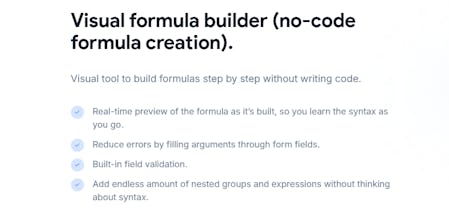
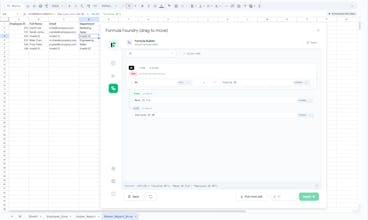
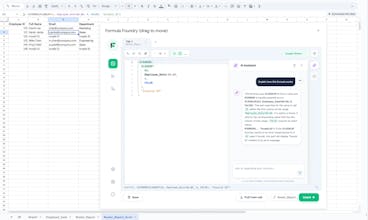
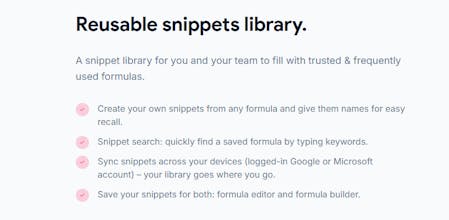
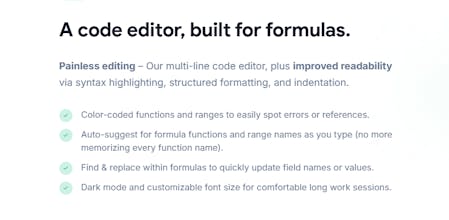
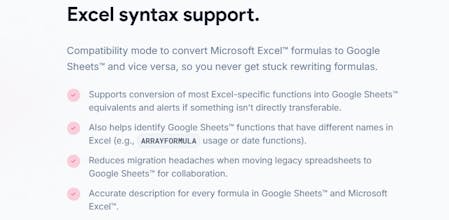
Formula Foundry simplifies formula creation and management in Google Sheets and Microsoft Excel, with an AI assistant for generation and debugging. Key features: -Visual builder for IF, QUERY, XLOOKUP, VLOOKUP -AI assistant to generate or explain formulas -Automatic Excel ↔ Sheets translation -Reusable variables (e.g., @@TaxRate) -Formula snippet library -Rich editor with syntax highlighting Now with full native Excel support via Office Add-in. Free trial, no card required: formulafoundry.io






If you’ve ever had to build a custom attribution model or a cross-campaign reporting sheet in Google Ads, you know the literal pain of a broken formula at 2:00 AM before a client meeting. I’ve been doing this for years, and the standard way of handling formulas is just... fragile.
I started using Formula Foundry specifically to clean up my messiest tracking sheets. Being able to see the logic mapped out visually - instead of squinting at a string of text that looks like a cat stepped on the keyboard - is a massive relief. It actually makes my sheets client-proof because the logic is organized. If you're managing six-figure spends, you really shouldn't be relying on a single-line formula bar. Great launch, guys.
@pavel_prykhodko , LMAO, "cat stepped on the keyboard" is the most accurate description of a nested REGEX I've ever heard.
Honestly, marketing trackers were some of my primary test cases when I was building the engine. I knew that if the parser could handle a 1,000-character attribution formula with nested IFs and query strings without crashing, it could handle anything.
That "fragility" you mentioned is exactly what I wanted to kill. By treating formulas as structured logic blocks rather than just "text in a cell", we make them way harder to break by accident. I'm really glad it’s helping you keep those client meetings low-stress - that’s a huge win in my book!
Huge congrats on the launch! I just went through the Product Hunt cycle with my own project a few weeks ago, so I know exactly how much work goes into a V1 like this.
Spreadsheet logic is usually where productivity goes to die, so seeing a legitimate IDE for Excel/Sheets is honestly huge. The UI looks super sleek and it feels like a tool built by people who actually code. I’m definitely going to be using this to track my own product metrics from now on. Rooting for you guys to hit that top spot!
@ryanrudd , thanks, man! And big respect for your recent launch too - I was following your progress and you killed it. It's definitely a marathon!
You nailed it with the "productivity graveyard" comment. That’s exactly what I was trying to fix. I spent a lot of late nights making sure the engine handles edge cases without breaking the whole sheet, just so the grid could feel more like VS Code and less like a calculator from 1995.
Really glad to hear it’s going to help you track your own project. Let me know if you have any feature requests as you scale your startup!
@ryanrudd Thanks Ryan, that means a lot coming from someone who just went through the same level of effort. We hope it went well for you! We also couldn't agree more that spreadsheets are where productivity goes to die. It has been an unchanged paradigm for decades now with very little tooling to make it better. The last thing we wanted was to develop some clunky over engineered product that took more effort to learn to use than it was to just do the work in the sheet itself. We're also happy to hear you're going to use it, please feel free to reach out to the team and provide any feedback! Thanks again.
I work in HR and I use Excel for many hours every week. For me, formulas were always very scary and difficult. I was always afraid to make a mistake in my reports.
But Formula Foundry is very different. It is simple to understand. I can see my logic like a map, and I don't feel lost anymore. It helps me finish my work much faster so I can focus on people, not just cells. I am so proud of this team. Very good job!
@yuliia_sas , thank you so much for the kind words! I know how much work you put into those employee sheets every single day.
My main goal was to take all the "scary" parts of a formula and hide them behind a clean UI. It’s actually quite a difficult coding challenge to make something look that simple on the screen, but hearing that it makes your life less stressful makes all those late nights worth it.
So glad it helps you get through your reports faster! Let me know if you need help with any specific HR templates.
Working in the agency world, I see "Formula Fatigue" every single day. My media buyers are brilliant at arbitrage, but they often get bogged down in the syntax of their reporting sheets rather than the story the data is trying to tell.
What I love about Formula Foundry is that it feels like a translation layer. It takes the cryptic, almost dead language of standard Excel and gives it a living, breathing structure. It turns a wall of text into a logical sequence. It’s rare to find a tool that respects the logic of a developer while understanding the frantic pace of a marketing team. Formula Foundry definitely hits that sweet spot. Truly impressive work you guys!
@max_leletskyi , a "translation layer" - I love that! Honestly, that was the goal from day one. I spent so many nights trying to figure out how to bridge the gap between "I want to calculate my ROAS across these specific variables" and the absolute mess of brackets that usually follows.
As a dev, I always viewed formulas as a dialect of code, but you're right - it really is its own language. I've focused heavily on the Cross-Platform Translator because no one should be "lost in translation" just because they moved a project from Sheets to Excel.
Thanks for the support! Tell the team I’m ready for them to try and break my logic engine with their wildest campaign trackers.
As someone who spends most of my life in a proper IDE, jumping into Excel always feels like I'm trying to code with my hands tied behind my back. No variables? No multi-line visibility? It’s a mess.
I’ve been playing with the early build of Formula Foundry and it's basically the "Modern C++" update that spreadsheets desperately needed. The variables feature alone makes things actually maintainable. It’s refreshing to see a tool that doesn’t just "AI away" the logic, but actually gives you the infrastructure to build it right the first time. Good luck with the launch, guys.
@bjorn_king , really appreciate that! You hit the nail on the head - the lack of "state" in standard formulas is exactly why they become unreadable spaghetti so quickly.
That’s why I prioritized the variables engine. Under the hood, I’m treating the workbook as a flat dependency graph, and the variables act as named nodes that we can inject anywhere. It’s a lot closer to how we think about scoped logic in C++ than the "cell-referencing" nightmare we've all grown used to.
I'm still tweaking the evaluation order to make sure it's bulletproof for circular dependencies, so I’d love your brutal feedback on that once you’ve pushed it to the limit!
Hi guys! I am learning to be a data analyst for few years now. I spend many, many hours in Excel every day. Sometimes my head hurts because I must remember so many long formulas for my homework.
I tried Formula Foundry today and it is really cool! For me, it is much easier to see the “blocks” of logic than just a big mess of text. It helps me to understand how the formula works, not just copy and paste it. This is a very good tool for students who want to learn fast. I will show this to my class! Good luck with launch!
@yana_lymych , that is so awesome to hear! Honestly, when I was starting out, I also spent way too much time hunting for a missing comma instead of actually analyzing the data. It’s frustrating.
That’s exactly why we built the Visual Builder. I wanted to separate the logic from the syntax. If you can understand the logic flow, the spreadsheet shouldn't get in your way. Keep going with your studies - we need more good data analysts!
If you find a specific formula in your classes that feels "impossible" to build, send it to me. I’d love to see if I can make the engine even better for students like you.
This formula linter add-on has already sped up my daily spreadsheet work. I used to copy/paste formulas into another tool just to debug or clean them up, which completely broke my flow.
Being able to see syntax highlighting and errors directly inside the spreadsheet is a huge improvement, and honestly a game changer for complex formulas.
Highly recommended if you work a lot in Google Sheets or Excel. Big kudos to the team for building something so practical.
@victoria_romanova1 , that "copy-paste dance" was exactly the friction I was obsessed with eliminating! There is nothing worse than losing your train of thought because you had to jump out of your workbook just to find a missing comma in another text editor.
Getting a real-time linter and syntax highlighting to work smoothly inside the spreadsheet environment was probably one of my biggest "pull-my-hair-out" challenges during development. The APIs for Excel and Google Sheets weren't exactly designed to host a professional IDE, so I had to get pretty creative with how the engine hooks into the grid.
Hearing that it’s keeping you in the "flow" is the ultimate compliment for a developer. Thanks for the kudos - it makes the struggle with those API limitations totally worth it!