
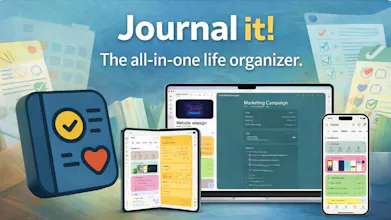
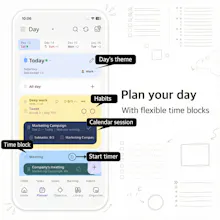
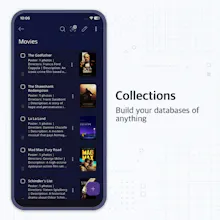
Your journal, planner, notes, habits, and goals shouldn't live in separate apps. In Journal it!, they're one interconnected system. Not features bolted together. One integrated system from day one, where planning, journaling, notes, and tracking actually work together. Available on Android, iOS, macOS, and Web. Mobile-first. Works fully offline. Optional E2E encryption. Built for individuals, not teams. Capable free version with unlimited items. Lifetime option available.




Free Options
Launch Team / Built With


Framer AI AgentsDesign and publish professional sites with AI
Promoted
Hi Product Hunt! 👋
I'm Hai, solo maker of Journal it!
I started journaling in 2014 because I kept forgetting things. What did I do last week? Last month? I couldn't remember. Journaling helped, but I soon realized it's more than a memory tool. It helps me think clearly and live intentionally.
In 2015, I taught myself programming and in 2016 built my journal app. The apps available were boring, just digital copies of paper journals. Nothing innovative. Not really taking advantage of what smartphones could do.
Over the years I discovered bullet journaling, second brain, and PKM. Ideas that empower individual productivity. They all point to the same insight: journaling, planning, notes, and knowledge work better together. Why keep them separate? I kept incorporating these ideas into Journal it!
That's how it became an all-in-one life organizer.
What makes it different:
- Mobile-first: most productivity tools are desktop-first with weak mobile apps
- Innovative design: built from scratch to handle everything in one place, not features bolted together
- Everything is interconnected: plans, notes, journal, and tracking all work together
- Works fully offline: your data is always accessible
- Optional E2E encryption: for those who want true privacy
- Built for individuals, not teams
Heads up: There's a learning curve. To make everything work together, I introduced some concepts you won't find in other apps. Check out the Getting Started videos if you want a quick intro.
I've worked on this full-time since 2017 and use it every day. This is my first official launch. I held off until the product felt truly ready.
I'm here all day to answer questions. Would love your feedback!
🎁 Launch day offers:
- Use code `PH2025` for 1 month Pro free
- How to redeem: look for the button at the bottom of the purchase view.
— Hai
@hai_nguyen19 Just discovered the app and it's still amazing me.Would love to support this immaculately resourceful app !
And though I would need some time to understand and effectively use this app , it still promises a great deal of structure and organisation.
Email : sunitamamgainmamgain@gmail.com
@harshita_mamgain The learning curve is real - I'd recommend starting with the Getting Started videos.
Thanks for supporting the launch. Sending your code now!
@hai_nguyen19 Thanks a lot ! I do have a question though , I am currently using the 1 month promo code , will the yearly promo code work after a month or it has a deadline to be used?
@harshita_mamgain the year code will replace the month one.
@hai_nguyen19
Hello :> Saw your post on reddit and decided to download the app.
Do you still have promo codes left? :> dora.poliac@gmail.com
@duskenpath Hope you enjoy it. Sending your code now!
@hai_nguyen19
Congrats on the launch! It’s awesome that you developed the app based on your learning experience. Can’t wait to try it out. Herr is my email: kevinllam@icloud.com
@kevin_lam4 thanks for the comment! Please check your mailbox for the code :)
@hai_nguyen19 Congratulations on the launch, this looks like a great app! I'd love a pro subscription if there are any left, that's generous thank you.
@darlingbri thanks for your support! Please try this one: RVP7-GKYR
@hai_nguyen19 I think it's pretty awesome that you are officially launching it today! I've been using it for several months now and yes, the learning curve is extensive but very well worth it in my opinion!
If I could offer a few suggestions, I've noticed that you cannot paste text from other documents into any entries for the Journal It. I tend to cross use both Daylio and Journal It and I find that I cannot copy text from Daylio into a timeline or note entry on the Journal It app. I don't know if it's just me but it's something I've noticed.
Also, is there a way to better categorize the labeling system? Like adding a way to group similar things into folders instead of just one long alphabetic list? 😅 I do a lot of extensive organization and sometimes it is annoying scrolling through every single kind just to find the label I'm looking for.
Outside of that, I absolutely LOVE the user interface including the recent update to all the icons and texts. Much easier and friendlier to the eyes I think. Keep up the good work!! 👍
theretiredcape@gmail.com 😁
@hai_nguyen19 hi, do you still have promo codes left? :)
@ms_robe that's weird. Have you tried pasting from another app?
You can set areas as parents for the labels and find them from the area's content view instead.
Thanks a lot for the feedback :)
@hai_nguyen19 hi! I did try and paste from another app and it did give the same issue but I found a workaround. For some reason, I have to go directly into the clipboard and select the text I copied and then it pops up. But it doesn't paste anything when you just hold and try and select "paste", at least not for me. 🤷♀️
Thank you so much for the promo code! Really love the app! 😁
@ms_robe Thanks for the info. I'll check it out. Glad you enjoy it :)
Hi, I would really love to use this, awesome product. Do you still have promo codes left? :) @veriteju@gmail.com
Many thanks!
@julie_verite sending the code. Hope you enjoy it :)
@hai_nguyen19 Hi, saw your post on Reddit and downloaded the app. Do you still have promo left ? akhilesh.ahinfotech@gmail.com
@akhilesh_singh5 thanks for supporting! Please check your mailbox.
Hey @hai_nguyen19 congrats on your first launch
Just saw your post on Reddit and downloaded the app. Is there any1year pro coupon code left? Thanks
@tiss_shay thanks for the comment. Please try this code: QNPB-HE28
Hi @hai_nguyen19 .
I am from India and I am interested in purchasing the lifetime subscription for this.
Do you have any consideration for purchasing power parity based on location? If not, I would request you to please consider providing the same as I am really interested in purchasing it.
Please let me know.
Thanks
@bmkmanoj no plan for that at the moment, but thanks for the suggestion.
Hi Hai,
Congratulations on the launch.
I would like to try this out. Do you have any promocodes left?
Hi! Do you still offer the 1 year? If so, can I please get a code for that? Excited to try!!