Your journal, planner, notes, habits, and goals shouldn't live in separate apps. In Journal it!, they're one interconnected system. Not features bolted together. One integrated system from day one, where planning, journaling, notes, and tracking actually work together. Available on Android, iOS, macOS, and Web. Mobile-first. Works fully offline. Optional E2E encryption. Built for individuals, not teams. Capable free version with unlimited items. Lifetime option available.
No reviews yetBe the first to leave a review for Journal it! - All-in-one Life Organizer
A year ago, I was fortunate enough to discover this app. The developer had been quietly building and refining it based on user feedback for years, without much promotion. I’m delighted that it’s now available to a wider audience. I wish it a fantastic launch!
Report
Maker
@arnavesh Thank you so much! It means a lot having early users like you here for the launch. Feedback from early users over the past years helped shape what the app is today. Really grateful for your support 🙏
I've used Journal it for over 3 years now and it is the BEST journaling app I've ever tried!
I used to journal in physical books but I wanted to go digital and this app has made it so beautiful and easy.
Some of my all time favourite features:
1) The flashbacks & memories, where journal entries from different points in time are brought back.
I love seeing what was happening on this day 3 months ago, etc.
2) The ability to add moods, organisers, stickers and more to entries.
I loveee this so much, especially the stickers!
3) The way it syncs across devices. I use it on my phone and PC as well.
There's a lot to love and I plan to try out more of the other features.
I really like that it's an all-in-one app, and I can have my tasks, calendar events, journal, etc. In one place.
There are few apps that I can say I LOVE TO PIECES.
Journal it tops that list!
Report
Maker
@piriye Wow, this made my day! 3 years - thank you for sticking with it.
So glad the stickers are a hit 😄
Thanks for the incredible support!
Report
This journaling app really helped me with several things. It helped me cope with some problems and capture the enjoyment of a normal day or a better one. It's like a companion. Using the app, you don't miss a thing during the day.
It has many features that are better than other apps. And everything is available there. Entries, everything. It's even beautiful in the web version.
I went to great lengths to find an app like this. One that was really good. I tried several, and they all felt like they lacked depth. And in this app, you can organize everything.
I thank the creator of this app because it's great and has helped me a lot. It's one of those apps that absolutely has to be on my phone. For me, it's an indispensable app, and I hope more people try it so they don't miss out on something so good.
(I really like that it reminds me of some entries. The day counter also helped me stay on top of making progress on some tasks/goals.)
This app is awesome, and the developer is a very nice guy who responds to all questions. However, be aware that the learning curve is steep due to the abundance of features, but the time invested is well worth it. I also have to applaud the fair price - it's a steal!
Congratulations on the launch! I’ve been using Journal it for over six months. I previously used ClickUp every single day and honestly couldn’t find a tool that rivaled it—until I came across this app in the Google Play Store. Since then, I haven’t gone back to ClickUp.
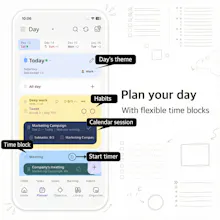
While there is a learning curve, it’s absolutely worth the effort. Once you understand how the system works, it’s incredibly intuitive for personal productivity. I use it to manage projects, plan multiple workflows, track habits, and time-block my day.
I’ve explored other features as well, but these core tools are what I use daily. With recent updates, I’ve started using the timeline more consistently, and now I rely on the app throughout my entire day. I’m really glad I found this tool—it just keeps getting better, and I’m excited to see how it continues to grow.
Report
Maker
@salinas_colon Thank you so much for this — it really means a lot.







A year ago, I was fortunate enough to discover this app. The developer had been quietly building and refining it based on user feedback for years, without much promotion. I’m delighted that it’s now available to a wider audience. I wish it a fantastic launch!
@arnavesh Thank you so much! It means a lot having early users like you here for the launch. Feedback from early users over the past years helped shape what the app is today. Really grateful for your support 🙏
Would love to try. Hook me up.
Email Id: kuldeepchauhan0502@gmail.com
@kuldeep_singh36 promo code sent. Thanks for your support!
I've used Journal it for over 3 years now and it is the BEST journaling app I've ever tried!
I used to journal in physical books but I wanted to go digital and this app has made it so beautiful and easy.
Some of my all time favourite features:
1) The flashbacks & memories, where journal entries from different points in time are brought back.
I love seeing what was happening on this day 3 months ago, etc.
2) The ability to add moods, organisers, stickers and more to entries.
I loveee this so much, especially the stickers!
3) The way it syncs across devices. I use it on my phone and PC as well.
There's a lot to love and I plan to try out more of the other features.
I really like that it's an all-in-one app, and I can have my tasks, calendar events, journal, etc. In one place.
There are few apps that I can say I LOVE TO PIECES.
Journal it tops that list!
@piriye Wow, this made my day! 3 years - thank you for sticking with it.
So glad the stickers are a hit 😄
Thanks for the incredible support!
This journaling app really helped me with several things. It helped me cope with some problems and capture the enjoyment of a normal day or a better one. It's like a companion. Using the app, you don't miss a thing during the day.
It has many features that are better than other apps. And everything is available there. Entries, everything. It's even beautiful in the web version.
I went to great lengths to find an app like this. One that was really good. I tried several, and they all felt like they lacked depth. And in this app, you can organize everything.
I thank the creator of this app because it's great and has helped me a lot. It's one of those apps that absolutely has to be on my phone. For me, it's an indispensable app, and I hope more people try it so they don't miss out on something so good.
(I really like that it reminds me of some entries. The day counter also helped me stay on top of making progress on some tasks/goals.)
@cha_cmirft_zurikla that's amazing. Thanks for sharing your experience ☺️
Hi hi - hoping to pay for a lifetime with a promo if possible!
Email: thekennywang@gmail.com
This app is awesome, and the developer is a very nice guy who responds to all questions. However, be aware that the learning curve is steep due to the abundance of features, but the time invested is well worth it. I also have to applaud the fair price - it's a steal!
@schwingi thanks a lot for the support 🙏
Congratulations on the launch! I’ve been using Journal it for over six months. I previously used ClickUp every single day and honestly couldn’t find a tool that rivaled it—until I came across this app in the Google Play Store. Since then, I haven’t gone back to ClickUp.
While there is a learning curve, it’s absolutely worth the effort. Once you understand how the system works, it’s incredibly intuitive for personal productivity. I use it to manage projects, plan multiple workflows, track habits, and time-block my day.
I’ve explored other features as well, but these core tools are what I use daily. With recent updates, I’ve started using the timeline more consistently, and now I rely on the app throughout my entire day. I’m really glad I found this tool—it just keeps getting better, and I’m excited to see how it continues to grow.
@salinas_colon Thank you so much for this — it really means a lot.