

KidMagic
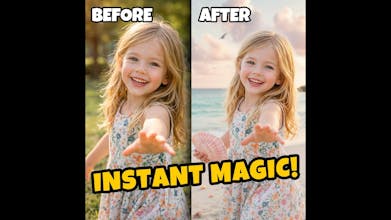
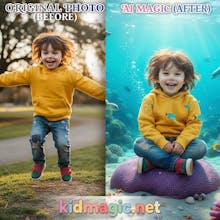
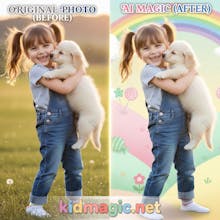
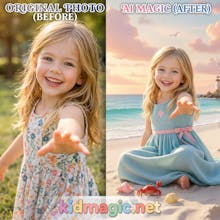
Turn everyday kid photos into magical AI adventures.
3 followers
Turn everyday kid photos into magical AI adventures.
3 followers
Stop paying $500 for studio shoots. KidMagic turns messy snapshots into cinematic adventures in seconds. 🪄 Why parents love us: ✅ Likeness Preservation: Your kid looks like themselves, not a generic AI doll. ✅ Zero Prompts: Just upload & pick a theme (Astronaut, Fairy, etc). ✅ Privacy First: Raw photos are NEVER stored; results auto-delete in 24h. Perfect for capturing childhood imagination without the stress. Bootstrapped with love for parents. Try the magic for free!

Free Options
Launch Team / Built With


@kidmagicnet
This is my first creation and wonderful.
Really love the focus on likeness preservation—that’s a huge pain point with most AI photo tools, and you’ve clearly addressed it thoughtfully. The privacy-first approach is also a strong trust signal, especially for parents.
One idea that might significantly increase engagement and retention: right now the fixed theme approach keeps things simple, but there’s an opportunity to go a step further by letting parents influence or create their own themes.
From my experience, parents often have very specific “mental images” or environments they want for their kids (based on hobbies, personality, or even cultural context). Even a lightweight customization layer—like allowing them to tweak scene elements, mood, or narrative prompts—could make the output feel much more personal and less “template-driven.”
This could also:
Increase emotional attachment to the results
Encourage repeat usage (trying different ideas)
Differentiate KidMagic from other AI photo tools that rely on preset styles
Overall, this is a really strong foundation - excited to see where you take it next 🚀
@david_wang39
Thank you so much for the deep dive and the kind words on our core pillars! 🪄
You’ve perfectly captured why we built KidMagic—to bridge the gap between "cool AI art" and "actually looking like my child" while keeping privacy non-negotiable.
I have some great news: we actually anticipated that exact need! 🚀
If you look under the "Magic Settings" panel on our site, you'll find an optional input box. It allows parents to add their own narrative or specific prompts on top of our existing templates.
We kept it optional because we want to ensure "One-Click Magic" remains accessible for busy parents, but we also wanted to give power-users the freedom to influence the scene—just as you suggested!
I’d love for you to give that a spin and let me know if it hits that "mental image" sweet spot. Your feedback is helping us shape the future of digital childhood memories! ✨
@kidmagicnet
Here’s a concise, persuasive version that blends everything smoothly and positions you as valuable:
This is a great direction—I really like how you’re balancing “one-click magic” with optional customization.
One idea that could elevate this further is turning generated images into a cohesive photo album experience - like themed timelines (Martial Arts Journey, Fantasy Adventures) where parents can also add captions or notes, creating a true digital scrapbook. That storytelling layer would significantly increase emotional value and retention.
On the technical side, I also noticed a common issue (e.g., slightly oversized faces in action shots). This typically comes from attention bias + multi-scale inconsistency in diffusion models, especially when combining child subjects, dynamic poses, and stylization. It’s not a bug, but a known limitation.
There are some solid ways to improve this at the system level:
Structural conditioning (pose/keypoints) to stabilize proportions
Face-to-body ratio checks for automatic validation
Multi-pass generation (composition → refinement)
Light post-processing for proportion correction
I’d love to contribute here - both on product features (like album/storytelling UX) and generation quality improvements. I can help test edge cases, refine prompts, and explore system-level fixes to push consistency further.
Happy to collaborate if you’re looking to take this to the next level 🚀
@lucy_lee913526
Wow, I’m genuinely impressed by the depth of your insight! Thank you for taking the time to share such a professional perspective. 🚀
You’re absolutely right about the "Digital Scrapbook" concept. Turning one-off magic moments into a "Themed Timeline" (like a child's growth from a "Little Pilot" to a "Space Captain") adds a layer of narrative and emotional depth that pure templates can’t match. It’s definitely on our long-term roadmap to move from a "tool" to a "memory-keeping platform."
On the technical side, you’ve pinpointed a classic challenge we’ve been wrestling with: the face-to-body ratio inconsistency in diffusion models. 🎯
We are currently experimenting with ControlNet for structural conditioning and exploring a multi-pass refinement pipeline to stabilize those proportions, especially for dynamic action poses. It’s a delicate balance to maintain that "Studio Quality" while automating the composition.
I would love to chat more about your ideas on system-level fixes and UX improvements. This kind of collaboration is exactly what we need to take KidMagic to the next level.
Could we connect further? Feel free to DM me on Twitter/X or shoot me an email at support@kidmagic.net. Would love to hear more about your experience in this space!
Best,
kong ling zheng