
Launching today

Lista
A simple to-do list with GTD workflows + iCloud sync
83 followers
A simple to-do list with GTD workflows + iCloud sync
83 followers
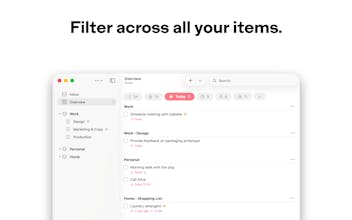
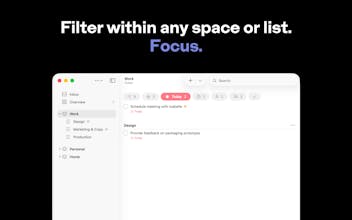
Lista helps you stay organized and focused with a simple structure and built-in filters that work at any level — globally, within a space, or within a single list. Powerful GTD workflows, naturally, with no configuration required. Privacy is core — iCloud sync and collaboration, your data stays yours. Designed natively for iPhone, iPad, and Mac.


I’ve been using Lista quite a lot, and honestly, it really stands out.
What I like the most is how natural everything feels. The whole spaces + filters logic just makes sense — I didn’t have to “learn” the app, I just started using it straight away.
It’s also fast, clean, and doesn’t get in the way. I open it, do what I need, and move on —no overthinking.
The privacy angle is a big plus as well. Knowing that everything runs through iCloud and there’s no account needed builds a lot of trust. 🥂
If I had one suggestion, it would be around communication: I think the product is stronger than what the text currently shows. Maybe adding a simple real-life use case could help people immediately “get it” and feel the value faster.
Overall, it doesn’t feel like just another to-do app — it feels like something built by someone who actually understands how people want to work.
Lista
@soraia_blas Thank you — this means a lot, especially coming from someone who's been using Lista since the beta.
"I didn't have to learn the app, I just started using it" is exactly what I was going for. That's the hardest thing to get right, and hearing it works that way is incredibly rewarding.
The point about communication is well taken and something worth thinking about.
Thanks again for the support, and for sticking with Lista since the early days. 🙏
Lista
Three years of focused work on a single goal: a to-do list app for iPhone, iPad, and Mac that gets out of your way.
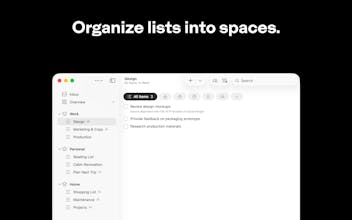
Lista makes powerful workflows feel natural. Organize lists into spaces, then filter at any level to focus on what matters. The same built-in filters are always available — globally, within a space, or within a single list. No configuration required.
Privacy is core. Your data is yours — invisible to us, exportable anytime. Sync and collaboration work through iCloud, with no account required.
Designed natively for Apple platforms, Lista feels at home on every device.
I'd love to hear what you think.
App icon and brand design by Chiachi Chao.
I keep switching between personal and work tasks throughout the day and most to-do apps either mix everything together or force you into separate accounts. Do the spaces actually let you keep those worlds apart while still seeing everything when you need to?
Lista
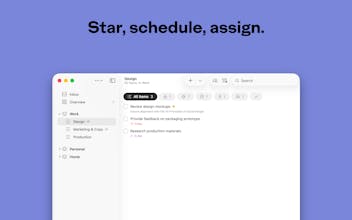
@klara_minarikova Yes, that's exactly how spaces work. You can keep personal and work in separate spaces, each with its own lists, and filter within each one independently. But when you want the full picture, Overview shows everything across all spaces. The same built-in filters — Today, Starred, Scheduled — work at every level, whether that's Overview, a space, or even a single list. No extra setup needed.
This sounds thoughtfully built. A lot of task apps either become too complicated over time or make you spend too much effort setting up your system before you can actually use it. I like that this seems focused on keeping the workflow powerful but still natural.
Curious, what kind of users are connecting with Lista the most so far, people already deep into GTD or those just wanting a cleaner everyday to-do app?
Lista
@akshay_kumar_hireid That balance between powerful and natural is exactly what I'm going for.
It's still early to say who's connecting with it the most, but I designed Lista for both. If you're into GTD, the structure supports it naturally. But if you just want a clean, reliable to-do list, it works just as well for that. The depth is there when you need it, but it stays out of the way.
@nunobaldaia That sounds awesome!
Lista
@akshay_kumar_hireid Thanks, Akshay!
this looks nice tbh. the part i like most is “no configuration required” because so many productivity apps start feeling like a project to manage on their own. keeping it simple while still supporting proper gtd workflows sounds like a good balance.
curious, what made you stick with icloud sync and no separate account system from the start?
Lista
@nayan_surya98 That's exactly the goal — the app should help you focus, not become another thing to manage.
iCloud was a natural fit for a few reasons. Lista is built exclusively for Apple platforms, so iCloud aligns well with that. It also ties into the "no configuration required" idea — you just open the app and everything syncs, no account to create. But the biggest reason is privacy. Your data lives in your private iCloud account, completely invisible to us. I can't see it, and I don't want to.
Three years on one product is serious commitment. I'm working on an iOS app and constantly have to resist the urge to add complexity just because I can. The fact that your filters work the same at every level, globally or inside a single list, is the kind of decision that only comes from living with something for that long.
Lista
@juelz It really is. A lot of that time was spent experimenting, trying things, and then pulling them back because they didn't fit. Everything has to make sense as a whole, and that means making real trade-offs. It might be tempting to add things just because they're useful in isolation, but if they don't result in an overall better experience, they're not worth it. That's how I plan to keep evolving Lista going forward. Good luck with your app — I share that instinct to resist complexity.