
Launched this week

Lista
A simple to-do list with GTD workflows + iCloud sync
87 followers
A simple to-do list with GTD workflows + iCloud sync
87 followers
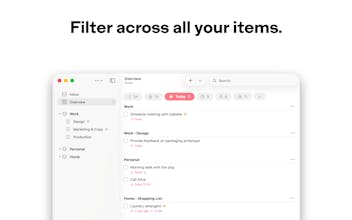
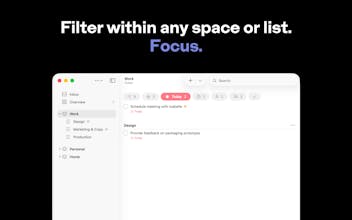
Lista helps you stay organized and focused with a simple structure and built-in filters that work at any level — globally, within a space, or within a single list. Powerful GTD workflows, naturally, with no configuration required. Privacy is core — iCloud sync and collaboration, your data stays yours. Designed natively for iPhone, iPad, and Mac.


Definitely will be trying this out. Finding a TODO list that actually works for me has been a challenge that I am sure many have ran into. I love the idea of spaces too. Best of luck!
Lista
@thatryan Thanks, Ryan! I hope Lista works well for you. Let me know how it goes.
Lista
Three years of focused work on a single goal: a to-do list app for iPhone, iPad, and Mac that gets out of your way.
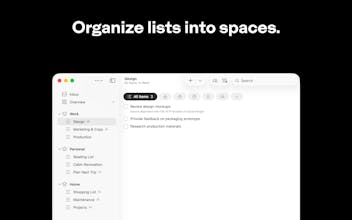
Lista makes powerful workflows feel natural. Organize lists into spaces, then filter at any level to focus on what matters. The same built-in filters are always available — globally, within a space, or within a single list. No configuration required.
Privacy is core. Your data is yours — invisible to us, exportable anytime. Sync and collaboration work through iCloud, with no account required.
Designed natively for Apple platforms, Lista feels at home on every device.
I'd love to hear what you think.
App icon and brand design by Chiachi Chao.
I keep switching between personal and work tasks throughout the day and most to-do apps either mix everything together or force you into separate accounts. Do the spaces actually let you keep those worlds apart while still seeing everything when you need to?
Lista
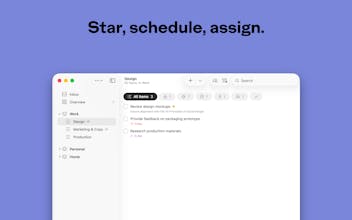
@klara_minarikova Yes, that's exactly how spaces work. You can keep personal and work in separate spaces, each with its own lists, and filter within each one independently. But when you want the full picture, Overview shows everything across all spaces. The same built-in filters — Today, Starred, Scheduled — work at every level, whether that's Overview, a space, or even a single list. No extra setup needed.
I’ve been using Lista quite a lot, and honestly, it really stands out.
What I like the most is how natural everything feels. The whole spaces + filters logic just makes sense — I didn’t have to “learn” the app, I just started using it straight away.
It’s also fast, clean, and doesn’t get in the way. I open it, do what I need, and move on —no overthinking.
The privacy angle is a big plus as well. Knowing that everything runs through iCloud and there’s no account needed builds a lot of trust. 🥂
If I had one suggestion, it would be around communication: I think the product is stronger than what the text currently shows. Maybe adding a simple real-life use case could help people immediately “get it” and feel the value faster.
Overall, it doesn’t feel like just another to-do app — it feels like something built by someone who actually understands how people want to work.
Lista
@soraia_blas Thank you — this means a lot, especially coming from someone who's been using Lista since the beta.
"I didn't have to learn the app, I just started using it" is exactly what I was going for. That's the hardest thing to get right, and hearing it works that way is incredibly rewarding.
The point about communication is well taken and something worth thinking about.
Thanks again for the support, and for sticking with Lista since the early days. 🙏
Three years on one idea shows. You can feel it in the decisions.
The consistency of filters across every level is the thing that stuck with me. Most productivity tools end up feeling like a loose collection of features that got added over time. This feels more like a mental model, something you can actually trust to behave the way you expect it to. That coherence is harder to build than it looks.
There's also an interesting gap you seem to be sitting in. People who want the structure of something like GTD but don't want to spend a weekend configuring it before they can use it. That middle ground is genuinely underserved. Most tools either overwhelm beginners or leave power users hitting ceilings. Lista feels like it quietly bridges that without making a big deal of it.
The one place I'd explore is how quickly the value lands for someone brand new. The product clearly earns its keep in real use, but the current messaging stays a little abstract. A single concrete scenario, something like watching a chaotic mix of personal and work tasks snap into clarity using spaces and filters in about thirty seconds, could do a lot of work. That before and after moment is usually what makes people go from "interesting" to "I need this."
Curious where you see this going. Is Lista meant to become a daily default for a broad audience, or are you more intentionally building for people who already think in systems?
I notice these things partly because I spend a lot of time looking at how SaaS products communicate value on first contact. This one has a strong product doing most of the heavy lifting. The story just needs to catch up.
Lista
@copywizard You've captured the essence of what I've been trying to build better than I've managed to communicate it myself.
"A mental model you can trust to behave the way you expect it to" — that's it. That's the goal. Every decision, every trade-off over these three years has been in service of that coherence. It's good to hear it comes through in the product.
You're right about the communication. I spent almost all of my energy building the product, not figuring out how to tell its story. My focus was on making it intuitive — something that earns its keep in actual use. And your comment suggests that part is working. But I know the messaging hasn't caught up yet. The concrete scenario idea is a good one, and it's something I need to work on.
On your question about audience — I'd say both, and that's intentional. Someone deep into GTD should feel at home in Lista. But what I care about most is that someone who has never heard of GTD can get the same benefits just by using the app naturally. The structure does the work for you — you don't need to be intentional about a system to take advantage of one.
@nunobaldaia Landon
That last part is actually the most interesting design challenge you've described: building a structure that works for people who don't even know they're using it. That's a much harder thing to pull off than explicit GTD, and honestly a much bigger market if you can communicate it right.
The way I'd think about the messaging: you're not selling a productivity system, you're selling the feeling of a chaotic day becoming manageable without any setup overhead. The GTD crowd will find you and recognize what you've built. The bigger opportunity is the person who's tried four task managers and quit all of them, not because they lacked discipline, but because the tools demanded too much before they gave anything back.
That "structure does the work for you" line you just wrote is actually really good. It's concrete, it's reassuring, and it removes the one objection most people carry into a new productivity tool. Worth testing somewhere prominent on the page.
Would genuinely enjoy seeing where you take the story from here.
Three years on one product is serious commitment. I'm working on an iOS app and constantly have to resist the urge to add complexity just because I can. The fact that your filters work the same at every level, globally or inside a single list, is the kind of decision that only comes from living with something for that long.
Lista
@juelz It really is. A lot of that time was spent experimenting, trying things, and then pulling them back because they didn't fit. Everything has to make sense as a whole, and that means making real trade-offs. It might be tempting to add things just because they're useful in isolation, but if they don't result in an overall better experience, they're not worth it. That's how I plan to keep evolving Lista going forward. Good luck with your app — I share that instinct to resist complexity.