
Launched this week

Notion MCP
Your Notion workspace, inside every AI agent
716 followers
Your Notion workspace, inside every AI agent
716 followers
Notion MCP connects AI tools like ChatGPT, Claude, and Cursor directly to your workspace, enabling real-time read/write access to your notes, docs, and databases. Built for AI agents, it delivers context-aware automation for creating docs, managing tasks, generating reports, and organizing knowledge turning scattered data into actionable workflows.

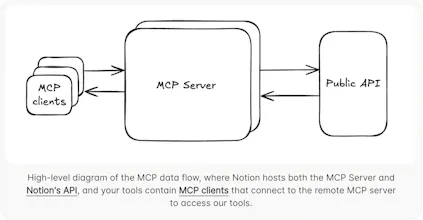
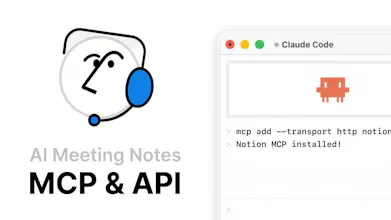


Real read/write MCP access to Notion databases is actually useful for sprint planning workflows - I can see agents updating task status, pulling blockers from a database, writing standup summaries back to a page. The "turning scattered data into actionable workflows" bit is doing a lot of work though. What's the write latency like in practice? Notion's API has rate limits that can make write-heavy agent loops painful.
@mykola_kondratiuk I like that sprint-planning example, that’s exactly the kind of workflow Notion MCP is built for. It runs on Notion’s existing API, so normal rate limits apply; batching writes usually gives the smoothest experience.
@rohanrecommends Good to know on the rate limits - building queuing logic on top is the right call. The sprint planning use case is genuinely my main interest here, going to try wiring it up with a sprint database this week.
@mykola_kondratiuk Love that you’re taking it straight into a sprint database :)
Yeah it clicks pretty well for sprint tracking - having the MCP write to Notion directly beats the copy-paste dance we used to do.
@Notion MCP brings your AI tools directly into your Notion workspace acting as a real-time bridge for tools like @Claude by Anthropic, @ChatGPT by OpenAI, and @Cursor.
It solves the gap between scattered data and generic AI outputs by making AI context-aware with your actual notes, docs, and workflows. Unlike traditional integrations, MCP is built specifically for AI agents... fast, seamless, and no complex setup.
Key features include real-time read/write access to Notion pages, support for multiple AI tools, admin controls, and workspace-level governance.
Perfect for developers, product teams, researchers, creators, and personal productivity - use it for documentation, roadmaps, research organization, content planning, and more.
Get started:
https://www.notion.com/help/notion-mcp
https://developers.notion.com/guides/mcp/mcp
https://github.com/makenotion/notion-mcp-server
https://developers.notion.com/guides/mcp/get-started-with-mcp
P.S. I hunt the latest and greatest launches in tech, SaaS and AI, follow to be notified → @rohanrecommends
@rohanrecommends How does it handle data privacy and rate limits for high-volume teams using Claude or Cursor daily?
@swati_paliwal Great question, Swati! On privacy, MCP only sees what your Notion integration already has access to, so everything stays within your workspace and the AI tool you connect.
The workspace governance piece is the part I keep coming back to. You can already wire Claude or Cursor into a Notion workspace via third-party connectors, but the access scoping is usually all-or-nothing. The fact that this runs admin controls at the workspace level — meaning you can limit which pages or databases a given agent can touch — is what makes this actually usable for team setups, not just solo power users. One thing I'd want to understand better: does the read/write access extend to database properties and relations, or is it still mostly page-level? For anything involving a linked task system, that distinction is the difference between useful and genuinely powerful.
@ivaylotz I think you’re spot on about workspace‑level governance. MCP works with both pages and databases, including properties and relations, and you can scope exactly which ones agents can read/write via config, so it fits linked task systems and more complex workflows, not just simple note editing.
I've been using Claude with the Notion MCP daily. Honestly, Notion AI itself is more accurate for in-workspace tasks, but where MCP really shines is when I need to pull context from my workspace and combine it with external info to create something new, like drafting a doc that reflects my product's latest data. That workflow just isn't possible with Notion AI alone. As a heavy Notion user in Japan, it's become one of the tools I rely on the most.
Congrats on the launch! My team uses Notion as our main knowledge base, so the idea of having AI actually read and write to it in real time is pretty compelling - instead of copy and pasting context every time you want something done. How does it handle permissions across a team workspace and can you control which pages or databases each AI tool actually has access to?
@simonk123 Thanks, Simon. MCP respects your existing Notion permissions, and you can further scope which pages/databases each agent can touch in your config.
We knew this was coming. Does this handle large posts, earlier we had to go the chunking API route, does MCP have something similar?
@chintant Great question, Chintan! I believe MCP sits on top of Notion’s API, so for large posts you’d still want a chunking or pagination approach rather than sending everything in one go.
Been using MCP servers since they came out and it's wild how fast the ecosystem is growing. The fact that Notion went official with this instead of leaving it to third-party wrappers is a good sign. Curious — does the read/write access work at the database property level or is it more page-level? For task management setups with lots of relations and rollups, that distinction matters a lot.
@thenomadcode Totally agree, Christophe, the MCP ecosystem has moved fast, and I'm glad Notion now has an official server in that stack. Agents can work with both pages and databases, so they can plug into fairly complex Notion setups. Hope this helps :)