

Perplexity
Where Knowledge Begins
4.9•87 reviews•4.4K followers
Where Knowledge Begins
4.9•87 reviews•4.4K followers
Your Research Assistant. Available wherever you are: 🤖 http://pplx.ai/android // 📱 http://pplx.ai/iphone
This is the 18th launch from Perplexity. View more

Perplexity Computer Skills
Launching today
Every builder has SKILL.md files sitting in their Claude Code or Codex setup.
Perplexity Computer Skills lets you import them directly, no rewriting, no translating.
Your workflows activate automatically based on context.
Same skills, 19-model execution.



Free Options
Launch Team


 ChatGPT by OpenAI
The SKILL.md portability angle is the real story here. I maintain a library of 100+ skills for Claude Code and the biggest friction has always been vendor lock-in. Being able to reuse those workflows across tools without rewriting is a genuine time saver. Curious how it handles complex multi-step skills with tool-specific syntax.
he SKILL.md format has quietly become a lingua franca for how builders encode their best thinking into AI agents.
Claude Code popularized it.
Codex adopted it.
And now Perplexity Computer supports it which means the workflows you've spent months refining don't have to live in one tool anymore.
That's the actual news here. Not just "Perplexity added a feature." It's that your institutional knowledge the how-to-handle-this, how-to-structure-that logic baked into your skill files is now portable.
The gap this fills:
Most power users of Claude Code or Codex have accumulated a small library of SKILL.md files.
Presentation builders.
Research frameworks.
Weekly briefing templates.
These aren't throwaway prompts they're curated playbooks that encode real judgment.
Until now, those lived in one tool's ecosystem.
What Skills actually does in Perplexity Computer:
Upload any existing SKILL.md file directly -- it works as-is if it has the right YAML frontmatter
Describe a workflow in plain language and Computer builds the skill for you (no technical knowledge needed)
Skills activate automatically based on query context -- you don't have to invoke them manually
Computer can combine multiple skills mid-task (Research + Content for a blog, for example)
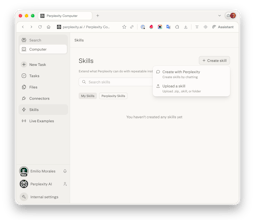
Browse and manage your library from a dedicated Skills tab
The execution layer underneath is what makes this different from just "importing a prompt."
Your skill now runs on 19 specialized models: Opus 4.6 for reasoning, Gemini for deep research, specialized models for images and video.
A SKILL.md that told one model what to do now tells the best model for each sub-task what to do.
Who this is for right now:
Builders and indie founders who've invested in building agent workflows on Claude Code or Codex.
If you've built more than five SKILL.md files, this is probably worth your attention today.
If you're newer to the format, Computer can generate skills from a plain-language description, so there's an on-ramp.
One honest caveat:
Computer is currently Max-subscriber-only at $200/month.
That's not nothing.
Pro and Enterprise rollout is coming, but if budget is a constraint, that's the real friction point to weigh.
The bigger question I keep turning over: as SKILL.md portability becomes table stakes, does the agent tool that wins end up being the one with the best execution layer or the one with the best skill library ecosystem? Perplexity is clearly betting on the former. Curious whether anyone here has already migrated workflows over and what the quality delta looks like in practice.
@rohanrecommends Congrats on the launch. Quick q here: have you tested migrating a Claude/Codex skill for content research or personal branding workflows yet; what was the biggest quality jump (or gap) in multi-model execution?
@rohanrecommends @aravindsrinivas @Perplexity Computer Skills As a heavy user of AI workflows, this "Computer Skills" module is really quite different.
Upgrade "prompt" to "reusable workflow template
Previously, long prompts were piled up in various chat interfaces, which were difficult to reuse and could not guarantee stable output. Perplexity's Skills transform these frequently used patterns into "naming and manageable skills", and they can be triggered automatically based on descriptions, providing a more experience similar to "requesting a fixed style AI employee" rather than randomly generating a prompt.
The two creation methods cover users ranging from beginners to advanced users.
If you can't write the SKILL.md file, you can directly generate it in the Computer using the "Create with Perplexity" dialog box. This is very suitable for product, operation, and analysis students.
For teams with their own knowledge base and standards, you can manage it using a .zip + SKILL.md format. Combined with the YAML frontmatter's name and description, it can achieve precise triggering and is already very close to the feeling of "lightweight workflow orchestration".
The automatic activation driven by the description + combined use is the highlight.
The series of relay tasks mentioned in the document, such as Research, Research Report, and Slides, are very crucial:
Users only provide requirements, and Computer selects and arranges the skills based on the descriptions.
In the same task, one can first conduct research, then write a report, and finally generate a presentation. This minimizes the need for manual copy-pasting.
This is closer to the real knowledge work scenario than a "super universal chat box".
It is very friendly to team collaboration and standardized output.
The "weekly report template", "competitive product research paradigm", and "data analysis report structure" are all made into Skills. New team members can directly reuse the SKILL.md accumulated by experienced members, which not only saves training costs but also ensures a more unified output style.
The following are the several points that I will pay attention to.
Permissions and Sharing: How to manage within a team or enterprise who can create, who can modify, and who can share skills
Version Control: SKILL.md, as a text, is actually very suitable for working with Git for version management
Observability: When complex tasks involve multiple Skills and the result is unsatisfactory, can one see the "call chain" to facilitate optimization
MacQuit
The SKILL.md portability angle is what makes this genuinely interesting. We're seeing the same pattern across the ecosystem — Claude Code, Codex, and now Perplexity all converging on markdown-based skill definitions. It's like Dockerfiles for AI workflows.
What I find exciting is the 19-model execution part. Right now most of us are locked into one model per skill. Being able to run the same workflow across different models means you can actually benchmark which model handles your specific task best — not just generic benchmarks, but YOUR actual workflow.
For context, I build native macOS apps and use Claude Code with custom skills daily. The pain point has always been: if I invest time crafting a perfect workflow in one tool, I'm locked in. Making skills portable changes the economics of investing in workflow engineering.
Curious: does it handle skills that rely on tool-specific features like Claude Code hooks or MCP servers? That's where portability usually breaks down.
@alamenigma The workflows I've seen get the most reuse are the ones that encode judgment, not just steps — code review patterns, research frameworks where the structure matters. The gap I keep running into though: SKILL.md tells the agent what to do, but it doesn't know why your team made the decisions behind the code. That context lives in closed PRs. Curious if anyone's thinking about that layer - connecting workflow skills to the institutional knowledge of the repo itself.
Snippets AI
The SKILL.md portability across Claude Code, Codex, and now Perplexity is a smart move — making workflows tool-agnostic rather than locking them into one ecosystem solves a real pain point for power users. Curious whether there's a versioning or diff system planned for skills, since iterating on a workflow across 19 models likely produces very different outputs than the original single-model setup.
The SKILL.md integration is a game-changer for agent workflow standardization. What I find most compelling is the 19-model execution - this solves the vendor lock-in problem that's plagued AI tooling. Being able to import existing Claude Code or Codex setups without rewriting means teams can actually compound their workflow investments rather than starting fresh with each new tool.
Curious about the activation logic: does the context-based workflow triggering use semantic matching or keyword patterns? And for teams with large skill libraries, how does it handle priority conflicts when multiple workflows could match?