
Launched this week

PopTask
Light menu bar task manager for quickly capturing tasks
511 followers
Light menu bar task manager for quickly capturing tasks
511 followers
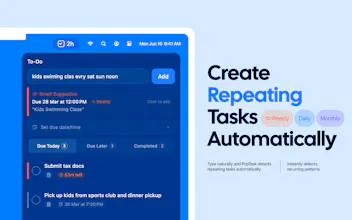
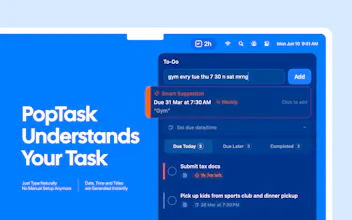
PopTask is a lightweight macOS menu bar task manager for quickly capturing tasks. Just type naturally even if the input is messy, shorthand, or full of slang and PopTask understands it and schedules it automatically. It supports 7 languages, shows smart countdown alerts, and includes AI powered scheduling and task breakdown. Everything runs on device on macOS 26 and later, with cloud support for earlier macOS versions.






Clipboard Canvas v2.0
Looks solid for quick task entry, but I'm curious about how well it handles context. What happens with tasks that require follow-ups or details?
PopTask
heyy @trydoff 👋🏽 you can add notes to any task for extra context, and the AI breakdown button splits it into clear steps .. and for now, follow-ups are just new tasks, you type "follow up with xyz on fri" and it schedules it instantly
but yes, gonna add this too in the next version 🙌🏽
PopTask
@lilhadi Many congratulations. Does this have context too? Example, vague stuff like "follow up on that contract thing next week" when you've got multiple contracts going, does it just parse the timing or try to get smarter about screen context too?
PopTask
heyy @rohanrecommends thanks mate!
right now PopTask parses the timing from what you type, so "follow up on that contract thing next week" gets scheduled for next monday with a cleaned up title, it's really good at the "when"
it actually doesn't read your screen or other tasks by design, as PopTask doesn't ask for accessibility permissions or read anything outside its own window cuz your tasks are just a local JSON file on your mac .. so it won't know which contract you mean, but that's a privacy tradeoff i'm comfortable with
i'm noting this down because you're not the first person to ask about smarter context and hopefully in the newer version i might add this!
Apparent for Gmail
@rohanrecommends @lilhadi Just an FYI, I think there may be a disconnect with your website's feedback form, as well as your email for reaching out.
PopTask
@apparentforgmail heyy jared, i just fixed it .. apologies for that 🙏🏽
@lilhadi How does the AI task breakdown handle super vague ones like "research AI sales tools," and does it pull from any local context to make subtasks even smarter?
PopTask
heyy @swati_paliwal 👋🏽 for something like "research ai sales tools" it actually handles it pretty well, it breaks it down into actionable steps like finding top tools, comparing features or shortlisting options ..
it doesn't pull local context right now, it only works with the task title itself as PopTask doesn't ask for screen reading or file access
honestly, my goal was "keeps it simple and private" 🙌🏽
this is so clean. curious about Focus Mode: what does it actually do? does it hide everything and just show the one task you're on?
PopTask
@jens_deryckere1 heyy .. this is already in my list but for now, there is no focus mode for specific task
currently, it shows due time on menu bar for the most recent task
(will update you 💯 once i go live with focus mode)
Is there a voice mode? Can I dictate a note, specify which group it goes to, and set a reminder by voice? That would be very convenient for people working in flow who can’t afford to get distracted.
PopTask
@mykyta_semenov_ heyy .. no voice mode right now, but macOS dictation works in the text field if you want to try it in the meantime
Radar By Paved
Hey @lilhadi -- as someone who has tried just about every to-do app, I really dig this. Really simple + the natural language support is killer. Two requests/comments: Thought about adding a system wide shortcut to initiate the menu bar pop down? Also, TAB support on the pop down to switch between fields and CMD + Enter to add new a new task? Feel like that would make it even faster to use. Nice work!
PopTask
heyy @dannygreer thanks, really appreciate that coming from someone who actually understands the pain of using other to-do apps
well, both of your suggestions are great ^
i actually added global keyboard shortcut to open PopTask from anywhere, but i was facing some errors so i skipped it in V1 .. definitely adding that in V2 💯
tab support between fields and CMD+Enter to submit are solid ideas too, will look into both on the upcoming updates .. thank you so much again, for such and amazing feedback!
Features.Vote
the "mtg w team mon wed fri 9am" example sold me, that's exactly the friction point, most task tools make you format your thoughts before they'll accept them.
does it handle recurring patterns from freeform input? like if i type "standup every weekday 9am" does it set up a repeat automatically?
PopTask
heyy @gabrielpineda 👋🏽 thanks mate!! honestly that was the idea, MAKE IT QUICK AND FAST IN ANYWAY
and yes, it does! "standup every weekday 9am" will automatically detect the recurrence and set it up for you .. daily, weekly, weekdays, monthly all work from natural input, exactly the kind of thing you shouldn't have to think about when adding a task
PopTask
also, it detects your weekdays according to the region .. as we, middle eastern start our week on sunday :') so it will start from sunday to thursday
Is it connected with Google Calendar or Calendly?
PopTask
@byalexai heyy 👋🏽 sadly, not now! PopTask is fully local, no external calendar connections yet .. everything stays on your Mac as a JSON file, Google Calendar integration is something worth exploring in a future version though