Launched this week

PulseDev
Click any UI bug on localhost and your AI agent fixes it
125 followers
Click any UI bug on localhost and your AI agent fixes it
125 followers
Stop describing UI bugs to your AI. Click any element on your localhost site, say what's wrong, and Claude Code, Codex, Gemini or OpenCode edits the right file. Watch it work live, then approve the diff on the page. Nothing is written until you do.



Free Options
Launch Team

Framer AI AgentsDesign and publish professional sites with AI
Promoted
Hey Product Hunt 👋
“The button below the second pricing card. No, the other one.”
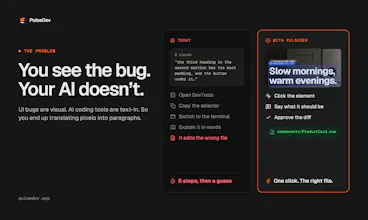
When you’re building a website with a coding agent, you can see what needs changing: a button that doesn’t line up, a heading that wraps awkwardly, or spacing that feels off. But getting that change made means turning what you see into a text prompt.
You explain where the element is. Open DevTools. Copy a selector or take a screenshot. Find the component. Switch to the terminal, paste everything in, and hope you’ve given the agent enough context. Then go back to the browser to check the result.
For a small visual change, explaining the task can feel like more work than the change itself. And when there are several things to fix, you repeat that process for each one.
I was already looking at the bug. I just wanted to click it.
That’s why I built PulseDev: to give your coding agent the context behind the element you’re pointing at, alongside your instructions.
From “which button?” to “make this button taller”
Click the element on your local site and describe what you want changed. PulseDev attaches the selected element’s context, including its selector and styles. The Vite plugin adds source mapping where supported, helping the agent locate the relevant code.
You still decide what the change should be. PulseDev handles the handoff from the page to your agent.
How it works
Open your local site in your browser and click an element. Shift-click to select more than one.
Describe the change: “Match this button’s height to the one beside it.”
Send it to Claude Code, Codex, Gemini CLI or OpenCode and follow the agent’s activity beside the page.
Review the proposed diff in your browser. Approve or reject it in review mode, or enable auto-apply when you want it.
Built for the tools you already use
PulseDev works with your own browser, local project and installed coding agent. Add the widget with a script tag, or use the Vite plugin for source mapping where supported. Your agent’s usual usage limits and provider charges still apply.
It’s for the UI work that adds up: adjusting spacing, matching styles between elements, changing copy, and polishing the details before you ship.
Free for one project on macOS. Pro unlocks unlimited projects. Subscribe before November 3, 2026 for $12/month and keep that rate. New subscriptions are $18/month from November 3. No promo code needed.
I’d love to hear about your workflow
- Think about the last UI change you asked a coding agent to make. What was harder: explaining which element you meant, or getting the change right?
- How do you share UI context today—screenshots, selectors, file paths, or descriptions?
- What would you need to see before trusting the proposed change?
- After trying PulseDev, where did you still have to explain yourself?
@perlat_kociaj Congrats on the launch, Sergii! Oops, I mean the PulseDev team.. Nice that you can review the diff in the browser before anything changes....
Thank you very much @bogdan_dzhelmach2 !
Yes, it is always good to review before you apply the changes directly on the browser.
does it work with frameworks other than vite, like next.js? or is it mostly the script tag there?
@antonio_shevelov Yes, this works with any framework. anything that runs int the browser actually. Even WordPress themes, even pagebuilders like Elementor!
Thanks to everyone who flagged that our download page said PulseDev isn't code-signed. That was leftover copy from the beta and it's now fixed.
PulseDev of course is signed with our Apple Developer ID and notarized by Apple, so macOS opens it without any warning or Terminal workaround. We really appreciate you pointing it out!
Nothing is written until you approve, love that.
I'd never let an agent touch files without seeing diffs first.
Shift-clicking two elements is a small detail I like. For 'make this match that', being able to point at both gets rid of a lot of explaining.
@oleksii_sekundant Yes this was part of "must have" when we started building this.
Give it a try and please do provide some feedback on how we can make this better.
The diff review in the browser is the part that would make me actually use this — I don't want an agent editing files from a screenshot description. I'm curious what the agent gets when there's no Vite source mapping: just the selector and computed styles, or does it still try to resolve the component? That's usually where 'make this match that' falls apart for me.
Quick q: is it Mac only for now? I'm on Windows most days and the free plan says one project on macOS. Clicking the element instead of describing it to Claude is the bit I'd pay for.
@thomas_wazza Thanks, really glad the click-to-select part landed for you! Yes, it's Mac only for now (macOS 13 or later). Windows is on our list and shows as "coming soon" on the download page, but we don't have a date to share yet, so we don't want to overpromise.
If you'd like a heads-up when the Windows build is ready, drop us a line at hello@pulsedev.app and we'll let you know.
@perlat_kociaj Cool thanks !