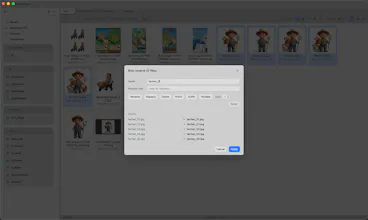
QuickFinder is a lightning-fast file manager for macOS and Windows. Organize folders with category shortcuts, preview images, PSDs and videos instantly, and compress, convert or edit media right in the explorer — no extra apps, everything runs locally.
No reviews yetBe the first to leave a review for QuickFinder
Maker
📌
---
👋 Hey Product Hunt!
I'm the maker of QuickFinder. I work with game assets and creative files every day — hundreds of sprites, PSDs, videos, and GIFs scattered across project folders. My daily routine used to look like this: find a file in Finder, open a converter to compress it, open another app to trim a video, then a website to convert a GIF... and repeat.
So I built QuickFinder: a file manager where all of that happens in one window.
What it does:
🗂️ Category-based folder shortcuts — jump to any project folder in a keystroke
🖼️ Instant previews & thumbnails for images, PSDs, and videos
🎬 Built-in media tools — compress images/videos/PDFs, trim & speed up videos, convert GIFs, remove backgrounds, batch rename
⚡ 100% local — your files never leave your machine, no uploads, no waiting
↩️ Undo for file operations (yes, even deletes and renames)
It's built with Tauri (Rust), so it's fast and lightweight — the installer is just a few MB.
QuickFinder comes with a 14-day free trial (no credit card needed), so you can try everything before deciding.
This is my first launch here, and I'd genuinely love your feedback — especially on which media tools you'd want next. I'll be around all day answering questions! 🙏
---
Report
honestly the category shortcuts feel like something i didn't know i needed, just way faster than digging through folders. previewing psds without opening photoshop is a nice touch too.
Report
Maker
@veyselklbedmhc "Thank you! We really put a lot of effort into optimizing the PSD and PSB previews. Since I use Google Drive heavily myself, my main focus was fixing those annoying issues where thumbnails get cropped or take forever to load. As you keep using it, you'll find a bunch of other handy convenience features too. Hope you enjoy them!"
honestly the category shortcuts feel like something i didn't know i needed, just way faster than digging through folders. previewing psds without opening photoshop is a nice touch too.
@veyselklbedmhc "Thank you! We really put a lot of effort into optimizing the PSD and PSB previews. Since I use Google Drive heavily myself, my main focus was fixing those annoying issues where thumbnails get cropped or take forever to load. As you keep using it, you'll find a bunch of other handy convenience features too. Hope you enjoy them!"