
Raccoon AI
World's First General Purpose Collaborative AI Agent
388 followers
World's First General Purpose Collaborative AI Agent
388 followers
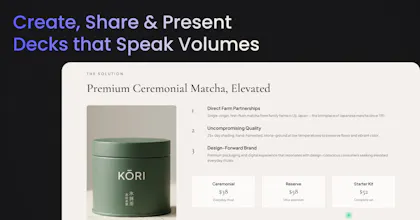
Raccoon AI is a collaborative AI agent and workspace for getting real work done. You describe what you need and build it together with an AI agent that has its own computer, terminal, browser, and internet. You see every thought, every file it creates, every decision it makes. You steer when it drifts. You ship when it's right. Deploy web apps. Run deep research. Analyze data. Create pitch decks, videos, images, documents.






@shubh_saras Many congratulations on the launch, Shubh! How does Raccoon handle long running workflows without losing context or crashing?
@curiouskitty I love this question, here's how we handle it today:
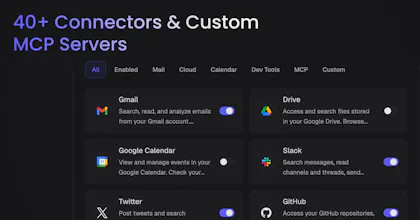
Most connectors use OAuth or API keys with scoped permissions, the agent can only access what you've explicitly granted and you can disconnect a connector anytime, and the access is revoked immediately and all related data is deleted from our systems.
On top of that you can choose which tools you want to enable or disable for any particular connector, this way you can choose to give less privileged access to the agent even if the connector's scopes are broader.
Everything runs in a sandboxed environment, each session gets it's own isolated computer. The agent's terminal, browser, and file system are containerized. It can't touch anything outside that sandbox unless you've connected a specific integration.
Custom MCP servers are user-controlled. You bring your own server, you define what tools it exposes, and you control the endpoint. We don't inject anything into that connection.
On audit/visibility: Every action the agent takes is visible in real-time in the session. You can see its thinking, the commands it runs, the files it creates, and the API calls it makes. Session history is preserved so you can rewind and inspect any step. Raccoon AI today is arguably the most transparent AI agent you will find on the internet.
What we're still building: granular per-tool permission toggles (so you could say "read from GitHub but don't push"), team-level access policies, and exportable audit logs(we store them, but there is no way to access them on the UI currently). These are on the roadmap as we move more toward team/enterprise use cases.
For a team getting started today, I'd recommend: connect any of the integrations you want, but only enable those which are actually need for a given workflow, use custom MCP servers for anything touching sensitive internal systems so you control the boundary, keep write tools disabled for sensitive connectors, and let the agent come to you with why does it need that particular tool and how it will use it and use Plan Mode to review the agent's proposed steps before it executes.
Happy to dig deeper and answer more questions.
Oh this is interesting for content workflows. Can it pull from Google Drive, write a draft, then format it into a doc - all in one go? And does it remember context between sessions or does each session start fresh?
Congrats on the launch btw!!
@kate_ramakaieva Thank you so much :). And yes, it can do all of that in one go. Each session starts afresh currently, we have got mixed reviews on cross session context sharing from users, and we are considering launching it as a toggleable feature really soon.
Really impressive launch 🚀
The managed workspace + real-time steering concept makes agent workflows feel much more tangible and production-ready.
How do you see this evolving compared to IDE-native agents — do you expect most execution workflows to move to browser-based agent environments like this?
@garvit_jindal Thank you so much :)
Honestly, IDE-native agents are amazing for coding and that experience is hard to match in the browser. We're not trying to replace that. The longer term vision is for Raccoon AI to connect to your remote systems and live where you work, not just in the web.
But we do think the web is where this is all heading. Karpathy said it well yesterday: "humans are moving up and programming at a higher level now. The basic unit of interest isn't one file anymore, it's one agent."
And when the unit of work is an agent doing research, building a site, analyzing data, creating a deck, all in one session, you need something bigger than a code editor. You need a canvas. A higher order execution platform. The web is the natural home for that.
How does Raccoon AI handle situations where the agent makes a critical or irreversible action, such as deploying code or deleting files, without explicit user confirmation?
@mordrag We have a rewind functionality built exactly for this. If the agent makes an error or starts drifting, you can rewind back to any of previous messages and the state of the workspace is restored to what it was at that point including recovering any deleted files.
For things that happen outside the sandbox like you mentioned deploying code, we have implemented guardrails to prevent the agent to do such things without your explicit permissions, and in case that still happens, the agent is smart enough to rollback things safely and cleanly on your request.
hi, congrats on your launch!
I see it's general purpose tool, but I wonder are there specific use cases you want to nail during this launch?
I believe it's hard to expect world class output on every possible task
@mike_sykulski yes it is, primarily we are looking at knowledge work, web apps and presentations. E2E Image and video generation workflows are close runner ups.
As AI gets more prolific, I find myself moving away from generalized tools to ones that do a specific job very well. Is there a particular workflow that Raccoon AI does especially well?
@lienchueh Two things:
Any kind of knowledge work. Deep research with real sources and citations, competitive analysis, data analysis with visualizations, writing reports and documents, due diligence, literature reviews, market sizing. If it involves reading, thinking, and producing a deliverable, it handles it really well.
End-to-end projects chain multiple skills. It's that you don't have to context-switch. The agent has a full computer and remembers everything in the session. So the output of one task becomes the input to the next naturally.