
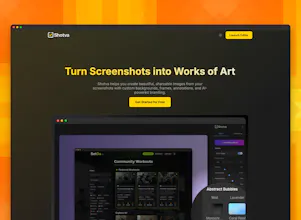
Shotva instantly transforms plain screenshots into polished, share-ready visuals. Add beautiful backgrounds, drop shadows, and custom branding–perfect for social posts, presentations, or product showcases, all in your browser.


Free
Launch Team

MailChannels Email APISend transactional email with tenant-level abuse control
Promoted

Hi PH!
Ever take a screenshot you’re excited to share… and then realize it looks flat, boring, and not at all share-worthy? That’s why I made Shotva.
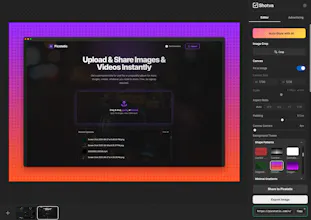
I wanted a dead-simple way to make screenshots look amazing without firing up heavy design software or spending 20 minutes fiddling with settings. With Shotva, you drop in your image and–boom–it’s instantly polished with clean backgrounds, drop shadows, text, feature magnifiers, and a style that makes people want to click.
It’s fast, it’s fun, it's free, and it works right in your browser. No installs, no login. No learning curve. Just better screenshots in seconds.
Give it a try and let me know what you think!
As a solo developer, I live for tools like this - free, no-nonsense, and instantly useful. Tried similar apps before but they all ceased, no updates... What's the roadmap looking like? Any plans to keep improving and maintaining it?
Quick and easy. But I would like a way to have text at the top vs. dead center.
When I export, the file is zero kb.
I’m on my iPad. Is that the issue? Which browsers do you require? Thanks!
@sara_laidlaw this might be an artifact of the tablet/touch interface, but try long pressing on the text layer and you should be able to drag it around?
@chrisfay OK. I was able to activate the text and drag it up, but as soon as I let go, it goes back to dead center of the image.
@chrisfay I tried Safari and Chrome on the iPad with the same result. It will drag, but the text returns to the center when I let go. And there is no wrap or enter to push to another like, correct? I’m traveling. I’ll try my laptop on Thursday. Thanks!
Nice, a way to make screenshots not look like they came straight from 2005! I’m constantly grabbing quick shots for client decks, and they always look so flat. Shotva’s instant polish—especially the clean backgrounds and shadows—makes them feel presentation-ready in seconds. Seriously, how did we not have this before? Curious if you’re planning to add preset brand color themes—would make my workflow even faster.
Congrats on the launch! This sounds like a super handy tool for quickly sprucing up screenshots. I often find myself needing just a little polish without the hassle. My question is, how much customization is available for the 'instant polishing' styles? Can users tweak things like background colors, shadow intensity, or font choices, or are they fixed presets for simplicity? Curious to know! @Shotva
@mackma Yes, all can be adjusted! The canvas, frame and image have controls, and layers like text and magnifier have separate layer controls you can tweak as needed. Glad you like the tool!
This is brilliant! ✨ The 'no installs, no login, no learning curve' truly makes it appealing for quick tasks. I'm curious, does Shotva offer any options to export the enhanced screenshots in different formats, like high-res PNGs or even WebP for web optimization? Thanks!
This is slick, love how it makes screenshots instantly presentation-ready. I've seen alternatives but this still feels like something completely different for turning raw captures into something you’d actually want to share.
@dheerajdotexe Thanks and glad you like it!