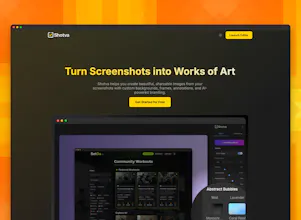
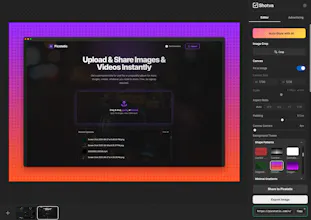
Shotva instantly transforms plain screenshots into polished, share-ready visuals. Add beautiful backgrounds, drop shadows, and custom branding–perfect for social posts, presentations, or product showcases, all in your browser.
No reviews yetBe the first to leave a review for Shotva
hotva is an absolute gem for anyone needing to spruce up screenshots! Launched recently, it swiftly turns basic screenshots into visually appealing, share - ready images right in your browser.
Report
clean execution on this - the no-login browser approach is perfect for quick shares. honestly been looking for something exactly like this for product demos.
what's your sustainability plan? seen too many good free tools disappear when hosting costs hit. would def pay for premium features if it means long-term support
@deeflect this is awesome to hear! Thanks for the kind words and stoked you like the tool. At some point down the line I'll probably introduce some premium features for power users to help keep the lights on, but would love to keep the core app free and super useful. I intend to keep evolving and maintaining it for sure. Have a good one!
Report
Love this idea, no one even think about to get the screen shot a good design before.
Whoa, this is truely awesome! The no-install, no-login thing is such a smart move — I hate signing up for stuff just to quickly edit a screenshot. Ngl, that alone makes Shotva a winner for me. So slick! How customizable are the styles?
Report
Love how Shotva instantly upgrades plain screenshots with sleek styles—drop shadows, backgrounds, and even branding? Game-changer. It’s so handy for elevating social posts or presentations at a click. I recently edited a visual snippet using a mobile tool that makes sharing polished content so effortless—check out this editor. Can’t wait to try Shotva in my next project!
@nisar_ahmad23 awesome, thanks! Do let me know what you think and how I can improve it for you.
Report
This is such a clean and useful idea! 🎯 I love how Shotva strips away all the complexity of traditional design tools and just focuses on making screenshots instantly look share-worthy. The no-login and in-browser approach is a huge win — makes it perfect for quick social posts or drop-in presentations.
Just tried it on a few messy screenshots and the polished backgrounds + shadows really make them pop. Definitely going to keep this in my workflow. 🚀
Curious — any plans to add custom brand color palettes or templates for consistent content styling? That would make it even more powerful for teams.
@leofeng Yes absolutely, the current brand scraping in the Advertising tab is limited but will be expanded with more goodies to make this more powerful. Thanks for checking it out!
Report
@chrisfay I see. It's great. Thank you for the reply.
Ngl, making screenshots look polished with just a drag-and-drop is realy genius. No fuss, no install—just instant glow-up. Big props for keeping it super simple!



hotva is an absolute gem for anyone needing to spruce up screenshots! Launched recently, it swiftly turns basic screenshots into visually appealing, share - ready images right in your browser.
clean execution on this - the no-login browser approach is perfect for quick shares. honestly been looking for something exactly like this for product demos.
what's your sustainability plan? seen too many good free tools disappear when hosting costs hit. would def pay for premium features if it means long-term support
Shotva
@deeflect this is awesome to hear! Thanks for the kind words and stoked you like the tool. At some point down the line I'll probably introduce some premium features for power users to help keep the lights on, but would love to keep the core app free and super useful. I intend to keep evolving and maintaining it for sure. Have a good one!
GPT-4o
Whoa, this is truely awesome! The no-install, no-login thing is such a smart move — I hate signing up for stuff just to quickly edit a screenshot. Ngl, that alone makes Shotva a winner for me. So slick! How customizable are the styles?
Love how Shotva instantly upgrades plain screenshots with sleek styles—drop shadows, backgrounds, and even branding? Game-changer. It’s so handy for elevating social posts or presentations at a click. I recently edited a visual snippet using a mobile tool that makes sharing polished content so effortless—check out this editor. Can’t wait to try Shotva in my next project!
Shotva
@nisar_ahmad23 awesome, thanks! Do let me know what you think and how I can improve it for you.
This is such a clean and useful idea! 🎯 I love how Shotva strips away all the complexity of traditional design tools and just focuses on making screenshots instantly look share-worthy. The no-login and in-browser approach is a huge win — makes it perfect for quick social posts or drop-in presentations.
Just tried it on a few messy screenshots and the polished backgrounds + shadows really make them pop. Definitely going to keep this in my workflow. 🚀
Curious — any plans to add custom brand color palettes or templates for consistent content styling? That would make it even more powerful for teams.
Shotva
@leofeng Yes absolutely, the current brand scraping in the Advertising tab is limited but will be expanded with more goodies to make this more powerful. Thanks for checking it out!
@chrisfay I see. It's great. Thank you for the reply.
Agnes AI
Ngl, making screenshots look polished with just a drag-and-drop is realy genius. No fuss, no install—just instant glow-up. Big props for keeping it super simple!
Shotva
@cruise_chen that was the goal–fast, easy and free. Glad you like it!