Launched this week

Sider Omni Sidebar
Give every Mac app an Agent Sidebar
944 followers
Give every Mac app an Agent Sidebar
944 followers
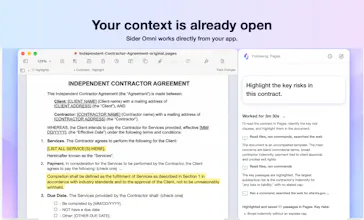
An AI agent beside any Mac app. Sider Omni sidebar sees what's on your screen and acts on it directly, right where you're working. Watch the result, ask for the next change. Nothing to copy, nothing to upload. Built on GPT-6 Astra, and it can run on your existing ChatGPT or Codex credits.




How does it handle privacy when it can see what is on screen Does it run locally or send screenshots somewhere?
@advin_jadis It doesn’t continuously record your screen or read it unless you start a task that requires it. Only then may a screenshot of the relevant window be sent to your selected AI service for processing.
Sider Omni Sidebar
@advin_jadis If you don't want the model to know, it won't know.
Does it work offline at all or does it always need internet to process the screen?
@jackthompson68 It currently requires an internet connection. This is something we’re actively considering, but local models are still significantly less capable at screen understanding and complex tasks.
Sider Omni Sidebar
@jackthompson68 It needs to connect to a LLM in the background, so internet is required for now, though we might add local model support later.
How do you prevent it from taking unwanted actions when it acts directly Is there a confirmation step before it changes something important?
@khaildnaseem Yes. Ask for approval is the default mode. Sider Omni asks for your confirmation before sensitive or high-impact actions or important changes, and only acts within the task you started and the permissions you granted.
Sider Omni Sidebar
@khaildnaseem Notice the permission setting for actions at the bottom left of the chat input box? You can just set it there.
I wonder how well it handles workflows across apps like taking something from Safari and using it in Notes or another tool.
Sider Omni Sidebar
@edward_paul3 You can definitely give it a try first.
@edward_paul3 Cross-app tasks like this are one of Sider Omni’s main use cases. It can organize content from Safari and add it to Notes or another app, saving you from copying and pasting back and forth.
Does Omni support keyboard shortcuts for quickly opening the sidebar or sending the current task?
Sider Omni Sidebar
@elsajonathan Yes, you can press both the left and right Option keys on the keyboard at the same time to turn it on or off, and this will be customizable in the future.
@elsajonathan Yes. By default, pressing the left and right Option keys together opens Sider Omni, and you can change the shortcut in Settings. Once you’ve typed a task, press Enter to send it.
Promomix
can it interact with non native web apps inside browser windows or just desktop apps?
@margret_rhyme It works across native desktop apps, Safari, browser-based web apps, and even apps with custom-drawn interfaces. Chrome also has a dedicated Sider Operator extension for more powerful browser use.
Sider Omni Sidebar
@margret_rhyme The browser is an app too, so of course it works there as well, but it can't operate the page as efficiently as our extension product does—it can only work through computer use.
The no copy and no upload workflow is an interesting approach. Does it keep any screen content locally when working with sensitive apps?
Sider Omni Sidebar
@seanfalconer There will be a cache, and you can clear it periodically. A clear cache button will be added in settings later.
@seanfalconer When a task requires screenshots, Sider Omni may temporarily keep the relevant captures locally to complete and verify the task. It doesn’t continuously record or save your screen in the background.