Launched this week

Sider Omni Sidebar
Give every Mac app an Agent Sidebar
944 followers
Give every Mac app an Agent Sidebar
944 followers
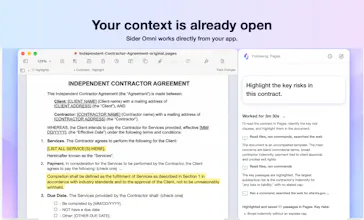
An AI agent beside any Mac app. Sider Omni sidebar sees what's on your screen and acts on it directly, right where you're working. Watch the result, ask for the next change. Nothing to copy, nothing to upload. Built on GPT-6 Astra, and it can run on your existing ChatGPT or Codex credits.




The screen awareness is the part I’m most curious about. How does Omni handle apps with sensitive information or screen?
@ben_d3 For any app or screen, Sider Omni only reads the relevant window when you explicitly start a task that requires screen context. It never reads information proactively.
Sider Omni Sidebar
@ben_d3 Simple, just don't run Omni on that window.
I wonder how it works in applications that have custom UIs, for example, Figma or Logic Pro. Does it depend on the accessibility labels in macOS or does it use mostly screen shots?
@keo_nha_cai32 It uses both, depending on what the app exposes. When macOS accessibility information is available, Sider Omni uses it to identify text and controls. For custom-drawn interfaces, it can also use screenshots to understand and interact with what’s visible. So it doesn’t rely solely on accessibility labels, though we’re still refining the experience across different apps.
As an avid user of client emails via Mail, my one bad practice is to retype the response three times. It will save me a few minutes if Sider Omni could read the entire email and type right from there. Does it support attachment as well or just visible text?
@priyanta_chakma Yes—you can ask Sider Omni to read the email and help draft or revise your reply right in Mail. If an attachment matters to the response, you can ask it to open that too; what it can read depends on the file type.
Does it add context across them or mainly control the visible interface?
@linpeng Both. Sider Omni uses the window it’s attached to as the main context, and it can also access relevant information and complete tasks across apps when needed.
Does using Omni consume credits based on every interaction or only when the agent needs the model?
@jasonwu Usage is based on the actual model processing involved in a task—it’s not a separate credit charge for every action the agent takes. You can also connect your ChatGPT/Codex account in Sider Omni and use the allowance from your existing ChatGPT/Codex plan.
Can the user tell Omni which window should be treated as the active context?
@simonclark55 Yes. Switch to the window you want to use, then click the Sider Omni companion beside it or use the keyboard shortcut to open the sidebar. The task will be linked to that window and use it as its context.
Does it automatically choose between ChatGPT and Codex depending on the task?
@noahanderson Sider Omni offers two model service sources: Sider and your connected ChatGPT/Codex account. You choose which one to use, and Sider Omni won’t automatically switch to the other based on the task.