
Launching today

Supapin
Scans your site to create pins + SEO‑optimized descriptions
107 followers
Scans your site to create pins + SEO‑optimized descriptions
107 followers
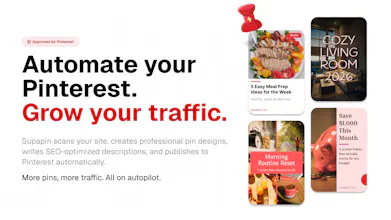
Supapin scans your site, creates professional pin designs, writes SEO-optimized descriptions, and publishes to Pinterest automatically. More pins, more traffic. All on autopilot.



Supapin
Hello Hunters! 👋
Today I'm excited to introduce Supapin.
A tool my brother (@campvictors) and I have been building to solve a problem we kept running into: Pinterest is one of the best sources of organic traffic, but creating and publishing pins consistently is painfully manual and time-consuming.
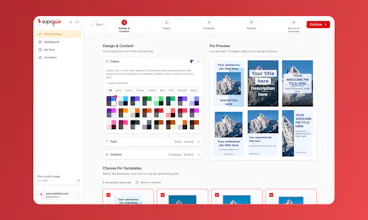
Supapin automates the entire Pinterest workflow.
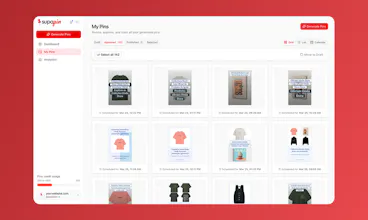
It scans your website, generates professional pin designs using your content, writes SEO-optimized descriptions, and publishes them to Pinterest on autopilot. 📌🤖
We built this for bloggers, e-commerce store owners, and marketers who know Pinterest drives traffic but don't have the time to manage it manually every day.
We're offering 50% OFF for 3 months for the PH community. Use code PH50 at checkout.
I'd love to hear your feedback and how you're currently handling Pinterest.
Thanks for checking it out! 😊
@campvictors @camposped Supapin seems like a powerful way to automate Pinterest growth!
I tried exploring the site and was curious do first-time users immediately know which step to take to see value quickly?
Love how many features are packed in would be interesting to hear how you guide new users through the experience
Supapin
@chi_78 thanks!
Appreciate the comment!
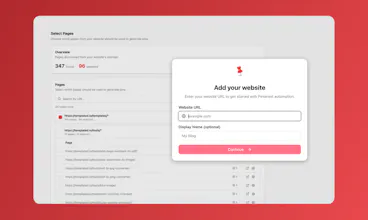
We tried to guide the user in the initial setup so it should start with the user adding his website and following step by step to see the pins generated.
It usually takes 3 to 5 min for the entire setup and schedule pins for a month!
@camposped That makes sense, getting to scheduled pins within a few minutes is a strong first win.
I’m curious though, do users move through that initial step smoothly, or is there any hesitation before they add their website?”
Interesting idea, how do you handle sites with lots of different products/pages without the generated pins feeling too repetitive?
Supapin
@cosmin1907 thanks for the comment!
We allow the user to select which pages he wants pins generated for, how many of those pages you want to repeat pins for and set other rules for scheduling.
Also, the user can manually modify, reject or aprove each pin before scheduling it for publishing.
Or run it on autopilot 😊
Biteme: Calorie Calculator
Congrats on the launch! Pinterest is so underrated for traffic. The auto board matching is what got me, that's usually the most annoying part. How accurate is it after a few hundred pins?
Thanks @dan16 ! 👊🏻
I completely agree. Pinterest is one of the most underrated traffic channels out there.
Regarding accuracy, board matching uses page content (title, description, main text) to find the best match among your existing boards. It's accurate most of the time. But even so, you have full control to reassign before publishing. The more descriptive your board names are, the more accurate the match will be.
There's also the option to generate AI-generated boards with better names and descriptions for your website.
Creem
Congrats on the launch!
Supapin looks great, planning to use it.
Is there a way to schedule the creation? If not, is there a plan/timeline on when this would be available?
Cheers!
Supapin
@sudoferraz appreciate the comment!
The initial pins are created in the initial setup and scheduled for the month. Then, next month, when your credits renew, we email you a new batch of generated pins for you to approve.
You can also modify the content and the design of each one individually in the editor.
We’re soon adding an option to run it fully on autopilot so it creates, schedule and publish pins without you even have to access our app 😁
Thanks @sudoferraz !
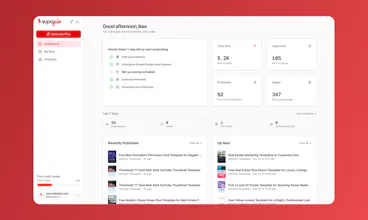
Yes, scheduling is already built in. You set how many pins you want published per day (we recommend 3–5), and Supapin automatically creates and publishes them on a rolling schedule. Once you connect your website and Pinterest account, it runs on its own every day.
Give it a try and let me know if you have any questions! 😁
sounds very interesting @camposped ! Let me know if you are planning to run any discounts. I run a bunch of blogs and would love to try out supapin. I have never really paid attention to pinterest as a channel so far.
Supapin
Hi@ambikaiyer29 !
Yes! We are offering a 50% OFF discount for our launch today.
You can use PH50 at checkout to get the discount.
Please let me know what you think of our tool and if you need any help.
Congratulations on the Supapin launch, @camposped & @campvictors! Good product... you scan a website and it automatically turns everything into pins. This kind of automation saves time.
I like this line in your testimonials: “Set it up on Monday, had 200 pins scheduled by Tuesday.” That line is very strong. It makes people stop and pay attention.
One small thing I noticed. Your homepage says “up and running in 3 minutes.” It shows a 4-step process.
Step 1 is clear: “Paste your website URL.”
But Step 2 says “Pick your pin style.”
There is no picture or example of what the pin styles look like. A new user might feel confused. They may wonder: “What am I choosing?” before they start.
I attached a screenshot to show what I mean.
I am curious... have you tried showing pictures of the pin styles earlier? This might help people decide faster.
Thanks!
Biteme: Calorie Calculator
@camposped @campvictors @taimur_haider1 Great feedback on the pin style previews. That's the kind of thing that seems small but makes a huge difference for new users trying to decide.
Sheet API
Congrats on the Launch Pedro!
Do you plan on adding an API for it in the future? I was thinking I could use my OpenClaw instance (or Claude Code) to operate it for me in the future, this will make it really easy to do :)
It would be awesome to ask it "What are the upcoming pins for this week" and have it from there.