Surgeflow
Automate your browser tasks with a single command
1.3K followers
Automate your browser tasks with a single command
1.3K followers
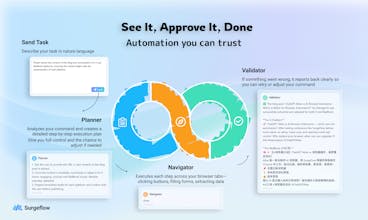
See the plan. Approve it. Watch it execute. SurgeFlow turns browser chaos into transparent automation across multiple tabs. Research, shopping, job applications—all with one command. Works in your browser—no need to download or install a new one.


Does it support scheduling? Would love to have it run competitor checks every Monday morning automatically.
The no-code aspect is huge. Forwarding this to my non-technical colleagues right now.
Browser automation is clutch for repetitive workflows. How does this handle dynamic content vs traditional tools like Selenium? Main use cases you're seeing from users?
The multi-tab automation is what sets this apart. Most browser AI tools help with single-page tasks, but real workflows span dozens of tabs - especially for content creators managing social accounts, analytics dashboards, and publishing platforms simultaneously.
The "see the plan, approve it, watch it execute" approach is smart for building user trust. Automation anxiety is real - people worry about tools going rogue. Showing the plan first gives users confidence.
Question: How does SurgeFlow handle sites that require login or have dynamic content that loads after page render? That's usually where browser automation breaks down in my experience.
few question : will it work on Linkedin job finder where there is no easy-apply and easy apply applicable
if i have excel for order can it go in dashboard and create order by self
Looks quite interesteinf
In-browser multi-tab automation—lightweight and clever. Key is stability on complex tasks (dynamic pages, cross-site flows) and security controls. If reliable, could be a personal productivity powerhouse. Bookmarked for testing.
Turning multi-tab operations into programmable workflows—no-install is a practical win. If it supports conditional logic, error handling, and integrates with existing toolchains (e.g., API triggers), it could become a team efficiency booster. Bookmarked for testing on dynamic pages and batch task scenarios.