See the plan. Approve it. Watch it execute. SurgeFlow turns browser chaos into transparent automation across multiple tabs. Research, shopping, job applications—all with one command. Works in your browser—no need to download or install a new one.
Your browser, supercharged with AI automation. That's it!
Install SurgeFlow as a Chrome extension in 30 seconds
Keep all your bookmarks, passwords, and existing extensions
No learning curve—same Chrome interface you know
No disruption to your workflow
📢Surgeflow wants you to keep your browser, your extensions, your setup.
Just Describe What You Need in Plain English
Forget visual workflow builders, code editors, or complex configurations. SurgeFlow understands natural language. The AI interprets your intent, creates the plan, and executes—all from a single sentence. No technical expertise needed.
Automation You Can See and Trust
Unlike black-box AI tools, SurgeFlow uses a unique three-stage system that gives you full visibility into every automated action. Our users are never surprised by what happens. They always maintain control, which makes the results reliable.
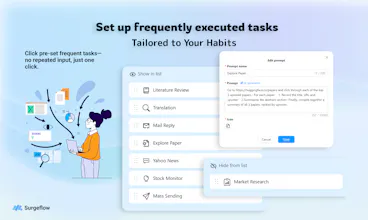
Ready-to-Use Quick Actions Library
Save your own custom commands as Quick Actions for instant reuse. Turn your most frequent workflows into one-click automation.
Works in Your Existing Chrome—No Migration Needed
Unlike Strawberry, Atlas, or other AI browsers, which require downloading a new application and migrating all your data. Surgeflow wants you to keep your browser, your extensions, your setup.
DM if you have any problems using or any feedback!
Wow this looks like something I actually need. I have 5 chromes with 15 pages each on different desktops...Sometimes i just forgot what I had a page open and opened the exact same page twice. Useful features I can think of: 1. If i can put 'go through all pages and remove duplicated ones' then surgeflow helps me do that. 2. Keep track on what i do earlier, cuz most of the time i'm multitasking, sometimes i lost track myself and miss something important. If it can remind me like when i just finished some task, that i was working on something earlier and did not finish, that would be super helpful.
SurgeFlow is a total game-changer for anyone tired of repetitive web tasks! This Chrome extension turns tedious, time-consuming workflows into one-click automations—right in your browser. No complicated setup, no coding skills needed—just pick the task you want to automate, and let the AI handle the rest. It’s fast, reliable, and has saved me hours of manual work every week. If you’re looking to boost productivity without the hassle, SurgeFlow is a must-have! 5 stars all the way.
SurgeFlow is a game-changer. As someone drowning in tabs and repetitive tasks, I was skeptical—but it actually works. Just told it “add these leads to my sheet and send a welcome email,” and it did both across three tabs in seconds. No setup, no code, just plain English. Built by people who get the pain. Highly recommend trying it for your most annoying browser chore!
Surgeflow is a practical browser extension that leverages AI to help users automate web-based tasks. Whether it’s form filling, data extraction, or repetitive clicking, it effectively improves efficiency and reduces manual effort.
The installation and setup process is straightforward and user-friendly, even for non-technical users. In practice, it performs reliably with good response speed, making it suitable for lightweight automation needs in daily work or personal projects.
If you frequently handle repetitive tasks in your browser, Surgeflow is worth trying. It doesn’t replace complex automation tools, but it does deliver tangible convenience in everyday scenarios.
SurgeFlow is a very useful software. For people like us who have no coding background, it is very convenient to use. It can automatically help me find websites and complete the content I require, and organize it into a table. I just need to wait for it to finish the task.So I will give it 5 stars
Unlike old-school automation that ‘forgets’ everything on reload, SurgeFlow keeps AI logged in with cookies — so it actually remembers. Perfect for multi-day workflows like order tracking.
It automates all those repetitive browser actions (think summarizing articles, sending follow-ups) and saves me tons of time. No more endless tab hopping!🤩
SurgeFlow feels like a smart AI buddy that just gets things done. Highly recommend giving it a try🎉


Surgeflow
Your browser, supercharged with AI automation. That's it!
Install SurgeFlow as a Chrome extension in 30 seconds
Keep all your bookmarks, passwords, and existing extensions
No learning curve—same Chrome interface you know
No disruption to your workflow
📢Surgeflow wants you to keep your browser, your extensions, your setup.
Just Describe What You Need in Plain English
Forget visual workflow builders, code editors, or complex configurations. SurgeFlow understands natural language. The AI interprets your intent, creates the plan, and executes—all from a single sentence. No technical expertise needed.
Automation You Can See and Trust
Unlike black-box AI tools, SurgeFlow uses a unique three-stage system that gives you full visibility into every automated action. Our users are never surprised by what happens. They always maintain control, which makes the results reliable.
Ready-to-Use Quick Actions Library
Save your own custom commands as Quick Actions for instant reuse. Turn your most frequent workflows into one-click automation.
Works in Your Existing Chrome—No Migration Needed
Unlike Strawberry, Atlas, or other AI browsers, which require downloading a new application and migrating all your data. Surgeflow wants you to keep your browser, your extensions, your setup.
DM if you have any problems using or any feedback!
Surgeflow
@eeeeeach Cheers, eeeeeach! :P
Wow this looks like something I actually need. I have 5 chromes with 15 pages each on different desktops...Sometimes i just forgot what I had a page open and opened the exact same page twice. Useful features I can think of:
1. If i can put 'go through all pages and remove duplicated ones' then surgeflow helps me do that.
2. Keep track on what i do earlier, cuz most of the time i'm multitasking, sometimes i lost track myself and miss something important. If it can remind me like when i just finished some task, that i was working on something earlier and did not finish, that would be super helpful.
Tate-A-Tate
SurgeFlow is a total game-changer for anyone tired of repetitive web tasks! This Chrome extension turns tedious, time-consuming workflows into one-click automations—right in your browser. No complicated setup, no coding skills needed—just pick the task you want to automate, and let the AI handle the rest. It’s fast, reliable, and has saved me hours of manual work every week. If you’re looking to boost productivity without the hassle, SurgeFlow is a must-have! 5 stars all the way.
Tate-A-Tate
SurgeFlow is a game-changer. As someone drowning in tabs and repetitive tasks, I was skeptical—but it actually works. Just told it “add these leads to my sheet and send a welcome email,” and it did both across three tabs in seconds. No setup, no code, just plain English. Built by people who get the pain. Highly recommend trying it for your most annoying browser chore!
Surgeflow
Surgeflow is a practical browser extension that leverages AI to help users automate web-based tasks. Whether it’s form filling, data extraction, or repetitive clicking, it effectively improves efficiency and reduces manual effort.
The installation and setup process is straightforward and user-friendly, even for non-technical users. In practice, it performs reliably with good response speed, making it suitable for lightweight automation needs in daily work or personal projects.
If you frequently handle repetitive tasks in your browser, Surgeflow is worth trying. It doesn’t replace complex automation tools, but it does deliver tangible convenience in everyday scenarios.
Surgeflow
@_05620258abee3a4bd84caa3 Go!!
Tate-A-Tate
SurgeFlow is a very useful software. For people like us who have no coding background, it is very convenient to use. It can automatically help me find websites and complete the content I require, and organize it into a table. I just need to wait for it to finish the task.So I will give it 5 stars
Surgeflow
Unlike old-school automation that ‘forgets’ everything on reload, SurgeFlow keeps AI logged in with cookies — so it actually remembers. Perfect for multi-day workflows like order tracking.
It automates all those repetitive browser actions (think summarizing articles, sending follow-ups) and saves me tons of time. No more endless tab hopping!🤩
SurgeFlow feels like a smart AI buddy that just gets things done. Highly recommend giving it a try🎉
Surgeflow
@new_user___1282025165cc92287e7a197 Yes! Let's go!