See the plan. Approve it. Watch it execute. SurgeFlow turns browser chaos into transparent automation across multiple tabs. Research, shopping, job applications—all with one command. Works in your browser—no need to download or install a new one.
No reviews yetBe the first to leave a review for Surgeflow
💎 Pixel perfection
Clean execution. One thing I noticed skimming the page is how many strong use cases you show,
it makes the product feel powerful, but also makes the first task decision non-obvious for a new user. Curious to see which workflows end up being the main entry point over time.
@roger_kaleba Hi Roger! Thanks so much for the kind words about the clean execution—means a lot coming from you! 🚀
You hit the nail on the head with that feedback—we’ve noticed the same thing with beta users! We wanted to showcase how versatile SurgeFlow is (since multi-tab automation solves so many pain points), but we totally get that it can feel overwhelming for first-time users choosing their first task.
Here’s how we’re addressing it:
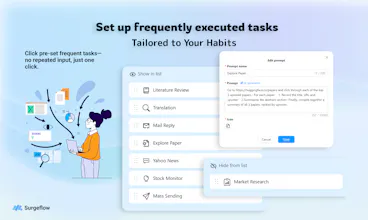
In the beta, we added a “Common commands” section that highlights the some workflows we tested (follow SurgeFlow on X, Collect news, summarize pages content, competitor research summaries) with one-click launch buttons—no decision fatigue!
We’re also tracking which workflows users gravitate to most (so far, data aggregation across tabs → Sheets is leading by a mile) to double down on those as primary entry points.
Long-term, we plan to add personalized onboarding: ask users “What’s your biggest tab-hopping pain?” and surface the exact workflow for them.
Curious—if you were a new user, which workflow would you want front-and-center? Would it be something specific like form filling, research compilation, or something else? Your perspective would help us tweak the entry experience!
Thanks again for the spot-on observation—this is exactly the feedback that makes SurgeFlow more user-friendly! 🙏
Report
@rocsheh Hey Zepeng, late reply on my end, but I really appreciate the thoughtful breakdown.
If I were brand new, I’d want one front-and-center promise tied to a concrete outcome, not a category of workflows. Something like: “Turn tab chaos into a clean Sheet in one click” feels like an instant mental win.
Once that lands, the other workflows read as expansion, not choices. Happy to keep noodling if helpful, this is a good problem to have.
Report
Super clean. What’s the #1 workflow users are getting the most value from—job apps, research, or shopping?
Report
Congrats on the launch! Turning messy multi-tab chaos into a single natural language command is a powerful idea. How does SurgeFlow handle more complex, multi-step tasks across different sites?
Report
This vs. traditional RPA tools – what's the main advantage? Genuinely curious about the tech approach.
Report
Does it support scheduling? Would love to have it run competitor checks every Monday morning automatically.
@avloss Hi Anton! Thanks for the love & congrats! 🚀
Great Q about outputs! We support actionable browser-native results like auto-filling sheets from tabs, posting to socials in one go, compiling research summaries, and more—all without switching tools.
Quick heads-up: we’re still in beta, so some edge cases aren’t perfect yet. Desperate for your feedback—any workflows or output formats you wanna see? Thanks again for checking us out! 🙏
The idea of posting to 5+ social channels in seconds caught my attention. From a marketer’s perspective, could this handle things like pulling data from Sheets, drafting posts, and scheduling across tools in one flow? This would save hours every week.




Clean execution.
One thing I noticed skimming the page is how many strong use cases you show,
it makes the product feel powerful, but also makes the first task decision non-obvious for a new user.
Curious to see which workflows end up being the main entry point over time.
Surgeflow
@roger_kaleba Hi Roger! Thanks so much for the kind words about the clean execution—means a lot coming from you! 🚀
You hit the nail on the head with that feedback—we’ve noticed the same thing with beta users! We wanted to showcase how versatile SurgeFlow is (since multi-tab automation solves so many pain points), but we totally get that it can feel overwhelming for first-time users choosing their first task.
Here’s how we’re addressing it:
In the beta, we added a “Common commands” section that highlights the some workflows we tested (follow SurgeFlow on X, Collect news, summarize pages content, competitor research summaries) with one-click launch buttons—no decision fatigue!
We’re also tracking which workflows users gravitate to most (so far, data aggregation across tabs → Sheets is leading by a mile) to double down on those as primary entry points.
Long-term, we plan to add personalized onboarding: ask users “What’s your biggest tab-hopping pain?” and surface the exact workflow for them.
Curious—if you were a new user, which workflow would you want front-and-center? Would it be something specific like form filling, research compilation, or something else? Your perspective would help us tweak the entry experience!
Thanks again for the spot-on observation—this is exactly the feedback that makes SurgeFlow more user-friendly! 🙏
@rocsheh Hey Zepeng, late reply on my end, but I really appreciate the thoughtful breakdown.
If I were brand new, I’d want one front-and-center promise tied to a concrete outcome, not a category of workflows.
Something like: “Turn tab chaos into a clean Sheet in one click” feels like an instant mental win.
Once that lands, the other workflows read as expansion, not choices.
Happy to keep noodling if helpful, this is a good problem to have.
Congrats on the launch! Turning messy multi-tab chaos into a single natural language command is a powerful idea. How does SurgeFlow handle more complex, multi-step tasks across different sites?
This vs. traditional RPA tools – what's the main advantage? Genuinely curious about the tech approach.
Does it support scheduling? Would love to have it run competitor checks every Monday morning automatically.
DeepTagger
Looks great! What sort of output does it support?
Congrats on your launch! 🚀
Surgeflow
@avloss Hi Anton! Thanks for the love & congrats! 🚀
Great Q about outputs! We support actionable browser-native results like auto-filling sheets from tabs, posting to socials in one go, compiling research summaries, and more—all without switching tools.
Quick heads-up: we’re still in beta, so some edge cases aren’t perfect yet. Desperate for your feedback—any workflows or output formats you wanna see? Thanks again for checking us out! 🙏
Triforce Todos
The idea of posting to 5+ social channels in seconds caught my attention. From a marketer’s perspective, could this handle things like pulling data from Sheets, drafting posts, and scheduling across tools in one flow? This would save hours every week.
Surgeflow
@abod_rehman Yes! Try it and feedback! Great thanks for your support!