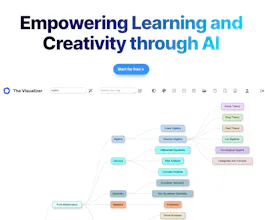
The Visualizer takes your written queries (and URLs, and PDFs) to OpenAI and responds with concept maps that support your learning and creative processes. It creates nodes and edges according to the context provided by OpenAI. Automatically. Just like magic.
Congratulations on the launch! I've encountered an issue – I'm not getting any results while using the free version on Windows with the Brave browser. Please let me know if you need any additional information to address this.
@manoj_11 How interesting, thanks a lot for pointing out. I've heavily tested Chrome and Safari for months with no issues. I'll check Brave but it souldnt be a problem. Do you mind testing other queries? Thank you!
@manoj_11 Please let me know how it goes or if you need any help.
Report
@marcos_gorgojo it is still not working for me. I have tested it in Chrome as well.
Request URL : https://app.thevisualizer.ai/gen...
I'm getting 499 Error status code after 4 minutes. I'm located in India
@manoj_11 Thanks for your thorough testing. The only difference between the free app and the paid version is that the former calls OpenAI API (3.5 turbo) while the latter calls Azure OpenAI (GPT-4-32k). While testing both I found there is less latency via Azure, responses are quicker and the app is 100% reliable. Sometimes, with OpenAI, it takes longer to get a response, and if you refresh (I guess I need to dig into the code of the free version), so closing the request from client side, it generates 499. The only way I can think to solve this is launching an incognito tab after some minutes. I am sorry you are experiencing this.
Report
This looks interesting, I need to give it a try. Congrats on the launch!


SocialBu
The Visualizer
The Visualizer
The Visualizer
The Visualizer
The Visualizer
Hey.bio
The Visualizer
The Visualizer
The Visualizer
The Visualizer