

Vozo AI — Video localization
Translate every layer: voice, subtitles & on-screen text
4.5•13 reviews•3.1K followers
Translate every layer: voice, subtitles & on-screen text
4.5•13 reviews•3.1K followers
Vozo AI delivers complete video translation — across voice, subtitles, lip-sync, and on-screen text.
Unlike traditional dubbing tools, Vozo translates every layer while keeping speech natural, lips perfectly synced, and visuals consistent. Turn one video into multilingual versions that look and feel native.
This is the 3rd launch from Vozo AI — Video localization. View more
Visual Translate by Vozo
Launched this week
Fully translated videos — finally.
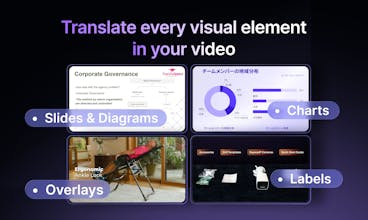
Visual Translate adds the final layer — translating text inside videos — on top of voice dubbing, lip-sync, and subtitles. It detects and translates on-screen text, from slides and diagrams to callouts and labels, while preserving the original layout, style, and animation. Turn slide videos and explainers into multilingual versions and reach a global audience — without recreating visuals from scratch.





Free Options
Launch Team / Built With


Sounds really cool! How many languages are supported, and do you clone voices?
Vozo AI — Video localization
@mykyta_semenov_ Thanks! Visual Translate currently supports 68 target languages, and our dubbing supports 73 languages. Our dubbing feature also supports voice cloning to preserve the speaker’s voice.
My favorite part is that I can choose what to translate and what not to translate. I just tried it on a video and the results are amazing.
Vozo AI — Video localization
@xfei Thanks for trying it out! This is actually a new feature we just added a few days ago, it lets you choose exactly what to translate and what to keep unchanged.
Hope you continue exploring the product and feel free to share any feedback or suggestions with us!
Preserving the original visuals while translating is the hard part most video translation tools either burn in subtitles or use awkward dubbing. How does it handle text that's embedded in the video itself, like on-screen graphics, lower thirds, or text overlays? And for languages with very different text lengths, does it auto-adjust the visual layout?
Vozo AI — Video localization
@dyanil_pereira Great question! That’s exactly the problem Visual Translate is designed to solve. Vozo detects text embedded directly in the video (like on-screen graphics, lower thirds, and overlays), removes the original text, and replaces it with the translated version while preserving the original layout and visual style as much as possible.
For languages with very different text lengths, the system automatically adjusts the layout to find a better fit, and you can still manually edit the text if needed.
Do you support voice translation?
Vozo AI — Video localization
@gm_c Yes, we do support voice translation.
You can use our Translate & Dub feature to translate the spoken audio and generate a new voice in the target language:
https://www.vozo.ai/video-translate
Vozo AI — Video localization
@gm_c Thanks for your question! Yes, we do! Give it a try, and let us know what you think :)
How accurate is the translation?
Vozo AI — Video localization
@shirley_mou The translation is powered by advanced AI models that understand both the visual and audio context of the video to ensure high accuracy.
For mission-critical translations, we also provide glossary support to maintain consistent terminology. In addition to text accuracy, we also consider dubbing duration and text length to ensure the results fit naturally across different scenarios. Give it a try and we are willing to hear your feedback :)
Atoms
That would be huge for creators testing different markets.
Vozo AI — Video localization
@zongze_x Exactly. That’s one of the main use cases we see. Creators can quickly localize a video and test how it performs in different markets without recreating the visuals.
Vozo AI — Video localization
@zongze_x Yes! That’s one of the things we’re excited about.
Do you support manual adjustments?
Vozo AI — Video localization
@shijun_liu Yes, our editor supports manual adjustments.
You can modify the original text and regenerate the translation, or edit the translated text directly. You can also adjust the text’s position, size, style, and even animations to better match the original video.