Y-Productive is a desktop app for Mac and Windows that helps to track Internet usage and provides feedback about your personal work productivity. Try it for free!
Hi PH! I am Alex.
In a first place, I’m a dad of a 2-year old son and a husband of a lovely wife.
And only then I’m a developer and a co-founder who spends all his work time with a laptop.
Every day, I want to finish my work on time, close that laptop and spend the evening with my family or have some rest.
It’s easier said than done. Did you ever notice how much distractions at our computer prevent us from reaching the goal?
Colleagues and friends ping every now and then;
Unplanned tasks ruin our schedule;
Facebook, YouTube, apps, and messengers spend budgets to develop features that will distract us for sure.
Now, you were so focused, and...
Our willpower is just not enough to handle the technological pressure.
To improve, I need to know WHY the heck I visit Facebook or use that app for a half of an hour? Did it harm my productivity or was it work-related? In real-time, please.
RescueTime or the analogs aren’t enough here. They either put a pile of “good-to-know” stats without any context on my head or are just too difficult to get through the UI every day.
We aim to make Y-Productive a blend of the most useful features to track and improve your workflow.
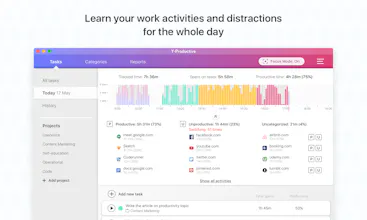
I and my teammates use it every day. How is it said? “Eat your own dog food”, right? Here is my productivity chart preparing for the launch for example:
We spent a good year in a beta polishing the app so I hope to hear what you think about it.
Let me know your thoughts or questions about Y-Productive!
P.S. don't forget to use the promo code: MEOWPRODUCTIVE on a pricing page (wink)(wink)
P.P.S. What's your opinion about the app? Maybe the field to improve or add new features? Would be glad to hear your thoughts, people!
@alex_zhebryakov Congrats with the launch!
I've beed first of beta users 1 year ago. The app improved a lot since that time. My favorite part is UI.
Can you please share plans for the future? What other feature do you want to add?
@andreyazimov thanks for asking! Our #1 goal is to implement the SmartCoach - an assistant that will provide useful tips during the day based on your habits.
We require more users however to teach the AI.
In the nearest future, we'll add the synchronization between different computers and the productivity profiles to switch the categorization on the fly for different work situations. Think work vs study or something similar.
Maybe there's some feature that's missing on your mind? Would be glad to hear the opinion of everyone here.
@alex_zhebryakov I think it would be great and you can start without AI. Just based on my data. Like best working average time. So If I start working at 9:00, 9:10, 9:20 recommendation could be 9:10 but if it keep increasing it should notify like "So supposed to work". So no AI needed.
Report
@alex_zhebryakov my problem is usually being productive on the laptop... right till I take the phone in the hands. i think I've heard that in a distant future you'd have a mobile app as well or am I just confused?
@lera_shukatka we could, but not like "all the features of desktop YP for the phone". iOS, sadly, has very strict restrictions with third-party apps tracking the screen time or blocking other apps.
Trying it out now and seems to be cool. Why not there is a enable button in incognito mode of chrome? And I also feel trail period should be more than 21 days at least to feel the real value of it.
@praveenpoojary1 not so long ago we had 7-day trial and people were asking for 14 days :D
Incoginto mode is intended - in case you won't need the app to track your website usage. It's incognito, after all.
@alex_zhebryakov I can understand incognito thing. I said 21 days because I remember reading somewhere that after 21 days product becomes your habit so have to buy subscription after that :-p
@alex_zhebryakov I tried searching for the source but without any success. I am sorry. By the way I am facing one issue, If I click on close button when app is in fullscreen then screen becomes dark and it is happening only if app is in full screen mode.(I use mac book pro retina 2016)
@praveenpoojary1 thanks for the reply. We will look into it. Could you write us in chat so our devs could dig into it?
Report
Hi @alex_zhebryakov,
I was using Toggl some time ago. It was enough to count hours spent on a specific task.
What the benefits I can get using Y-Productive?
What is the key difference between Y-Productive and RescueTime/Time Doctor?
Thank you in advance for the answers.
@andriybahlay Hi Andriy! Thanks for the question.
Actually, Toggl and Y-Productive serve for a different purpose. Sure, Y-Productive can track time, has task management and reports, just like Toggl.
But Toggl will just measure your time. It will not tell you if you wasted half of an hour for nothing and what you need to do to improve your work efficiency. It's just a good time tracker, that's it. Comparing Toggl and YP, think of a hammer and a microscope.
Now, TimeDoctor and RescueTime are closer to the point.
But YP combines task management and productivity feedback in a beautiful and simple way.
What's important, we have *context* for your activities. So you'll always know, why exactly your action was productive or unproductive for you, in a blink of an eye.
Did I mention that colorful insightful chart? :D
Report
@alex_zhebryakov Thanks for the answers.
>>But YP combines task management
--- sounds good. Do you have any plans in future to support Trello/Google Keep or something similar?
@andriybahlay yep, integrations is something one would expect, but we have more essential features on the way. Like offline data storage, categorization profiles and sync between different computers. Integrations will be the thing to make once we're done with the core app itself.
What integrations you think would be useful for you in YP?
Report
@alex_zhebryakov Having a Trello integration would be great. I'm using it every day as a primary task tracking system.
@andriybahlay What primary usecase you see for this integration?
Report
Hey @alex_zhebryakov, my goal for using the app is to get a habit to plan a day and follow such plan.
I tried achieving it with just a self-discipline, but it didn't really give a sustainable result. My hope is that Y-productive will help me to form such habit and support me in maintaining it.
For now it seems that it will do the job.
Do you by chance have any educational videos or articles on good practices of using the tool?
I saw the hint on the main page but would appreciate more on the matter - like
- what are the hints for reviewing the feedback?
- what are the patterns I may observe?
- how should I approach any negative patterns that I will observe?
Or maybe you can recommend any relevant resource/book on the matter.
Appreciate your response,
M
@michael_popchuk hi Michael! Thanks for sharing!
We have an intro video when you sign in in the app.
My team mate also wrote a nice article on topic:
https://www.y-productive.com/blo...
He shares tips on how to use Y-Productive in a most effective way. The main idea is that our time and energy for the day is limited, and we can use it a lot better.
Hints on how to combine such methods with the app functionality included ;)
I left Rescue Time after figured out they a) constantly got hacked and b) they sell data. If you think it's not related — you're wrong. It get hacked to sell the data as well. Think, services like that should avoid using cloud, or if they are, it must provide top security level.
Pros:
Good tool for tracking productivity. Think, macOS should provide it by defaults (as iOS will does since 12).
Cons:
Security risk: collecting tons of private data and doesn't provide multi-factor authentication
@grozyan Thank you for a feedback. We are going to implement an option to store the data locally and do no use any cloud storage. We understand the security concerns of our customers and trying to adapt as fast as we can, but the resources of our startup are limited (we bootstrap it from own pockets), so it will take some time.
Looking great, I've downloaded the app to give it a try. Usually this kind of tools only last a few days with me, but let's hope this one sticks!
How does the "uncategorized" category works, is it for apps that are not really productive but not really un-productive?
Other question, is there a way for an app to be sometimes in the productive category and sometimes in the unproductive? When I read medium, it can either be vers productive because it's directly work-related, or very unproductive because totally unrelated with my work ...
@pbriod hi Pascal! Thanks, great question actually.
We;re working to implement the categorization profiles to change it on the fly in different work situations (maybe it will be attachable to certain tasks).
Right now, yeah, need to deal with the dual nature of some apps. Shouldn't happen often though.
If I may ask, are there certain goals you aim to achieve using the app like ours? Maybe, become more focused, suffer less distractions or making more things done?
@alex_zhebryakov custom categorization profiles associated to tasks would be awesome, it would make a lot of sense for me.
Slack is a great tool and I can be productive when communicating on slack, but when I'm writing an important email or working on a design problem, checking Slack is actually hurting my productivity.
If I can find a tool that gives me a honnest feedback on my productivity, the simple fact of knowing that I'm tracking myself will make me more productive. What usually stops me from using a tool like this is when I feel like the tracking isn't really on point, and it loses value for me...
Report
Can I divide the time spent on different projects? Would this suit me if I'm a freelance most of the time?
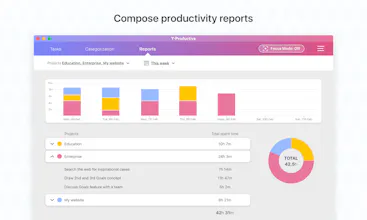
@vadim_besedin sure! We worked on this part very well. You can set tasks, projects and compose reports to share with a client, for example. Is that what you asked about?
Y-Productive
Web3 Jobs
Y-Productive
Web3 Jobs
Y-Productive
Edison Calendar
Y-Productive
Edison Calendar
Y-Productive
Edison Calendar
Y-Productive
Y-Productive
Y-Productive
Y-Productive
Y-Productive
Jerrycan
I left Rescue Time after figured out they a) constantly got hacked and b) they sell data. If you think it's not related — you're wrong. It get hacked to sell the data as well. Think, services like that should avoid using cloud, or if they are, it must provide top security level.
Pros:Good tool for tracking productivity. Think, macOS should provide it by defaults (as iOS will does since 12).
Cons:Security risk: collecting tons of private data and doesn't provide multi-factor authentication
Y-Productive
Monito
Y-Productive
Monito
Y-Productive