

How to Remotely Monitor a Phone for Safety: A Legitimate & Ethical Guide
We all want our loved ones to be safe. Whether it's a teenager with their first smartphone, an aging parent who might get confused, or a family member on a solo trip, the worry is real. The idea of using a phone to check in on them can seem like a logical solution—but it’s quickly followed by a flood of questions. Is this even okay? How does it work? Am I crossing a line?
The Critical First Step: Defining Your "Why"
Before you look at a single app, you have to get honest about your motivation. The line between safety monitoring and unethical surveillance is drawn by your intent.
What Legitimate Safety Monitoring Looks Like
This is about protection and well-being, with clear, proportional goals.
Transparency and Consent: The person being monitored knows about it and agrees (or, in the case of young kids, you explain it age-appropriately).
A Specific Safety Need: The monitoring addresses a real concern, like ensuring a child isn't contacting predators online, or knowing an elderly parent with dementia hasn't wandered off.
You Have the Legal Right: You’re a parent monitoring a minor child’s device that you own and pay for.
What Crosses Into Unethical Surveillance
This is characterized by secrecy and control.
It’s Covert: The monitoring is deliberately hidden from the device's user (like a spouse or employee).
It Lacks Consent: Monitoring an adult without their explicit permission.
The Motivation is Distrust or Control: The goal isn't safety, but to alleviate personal suspicion or restrict another adult's autonomy.
It’s Likely Illegal: Secretly monitoring an adult's communications often violates federal and state wiretapping laws.
My Strong Advice: If you're considering secret monitoring to address doubts about another adult—like a partner—stop. This is a fast track to legal trouble and relationship disaster. The solution to distrust is communication, not surveillance.
Your Toolbox: A Look at Different Monitoring Methods
If you have a legitimate need, you have options. They range from simple, built-in tools to more comprehensive suites. Think of it as a spectrum from basic location sharing to full digital oversight.
The Built-In (and Free) Options
Your phone's operating system already has powerful tools designed with privacy in mind.
For Apple Families: Use Screen Time (for app limits, content filters, and activity reports) and Find My (for location sharing). Both require setting up Family Sharing, so everyone knows what’s happening.
For Android/Google Families: Use Google Family Link. It lets you manage apps, set screen time limits, filter content, and see your child’s location.
Dedicated Parental Control Apps
Services like Bark or Qustodio offer more detailed oversight, especially on Android. They can:
Provide advanced web and app filtering.
Monitor certain social media and text for signs of bullying, depression, or predators (using algorithms, not by giving you a live feed).
Deliver detailed activity reports beyond simple screen time.
H3: Focused, Consent-Based Safety Apps
For families who primarily want location awareness without deep digital oversight, apps like Number Tracker fill a specific role. They work as a mutual safety network where everyone in a private circle agrees to share their location. The focus is on coordination (“We can see you’re on your way home”) and peace of mind, not monitoring private messages. You can learn more about this focused approach at number tracker.
The Legal Rules You Can't Ignore
You must understand the law. "I didn't know" isn't a defense.
Monitoring Minors: As a parent or legal guardian, you generally have the right to monitor your minor child's devices and online activity to ensure their safety.
Monitoring Adults: Here’s where it gets risky. Federal law (the Electronic Communications Privacy Act) typically makes it illegal to intercept someone's private electronic communications (texts, emails, calls) without the consent of at least one party involved. Secretly installing monitoring software on an adult's phone usually breaks this law.
Key Factors: Who owns and pays for the phone matters. Monitoring an adult child who pays for their own plan is murkier than monitoring a young teen on your family plan.
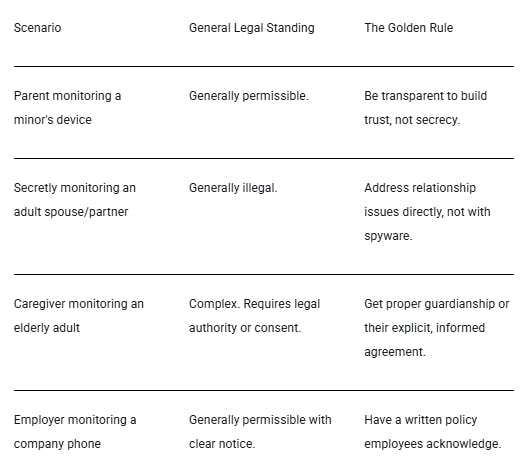
Here’s a quick guide to common scenarios:
The Ethical Way to Implement Monitoring
If you have a legitimate need and the legal right, how you do it determines whether it builds trust or destroys it.
Start with a Conversation, Not an App. Talk first. With a child: “We love you and want to help you stay safe online as you learn. Let's talk about some tools that can help us both.” With an aging parent: “I worry about you getting lost. Would you be okay sharing your location with me when you go out so I don’t have to bug you with calls?”
Use the Least Invasive Tool for the Job. Don't use a sledgehammer to crack a nut. If the main concern is knowing when your teen gets home from practice, a simple location-sharing app might be enough. You don’t necessarily need to read their texts.
Set Clear, Mutual Boundaries. Create family rules. “We will only check your location if you’re an hour late without checking in.” “We’ll review screen time reports together on Sundays to talk about balance.” Then, stick to those promises.
Focus on Teaching, Not Just Policing. Use insights as conversation starters. “I noticed a lot of YouTube time this week. What cool things are you watching?” The goal is to guide them toward self-regulation, not just enforce rules.
Ease Up as Trust is Earned. Gradually reduce monitoring as your child shows responsibility or as a safety situation improves. This shows you respect their growing maturity and independence.
“Technology is a useful servant but a dangerous master.” This old adage fits perfectly here. Monitoring tools should work for your family's safety, not become a source of control that harms your relationships.
A Different Perspective: In designing tools at Number Tracker, we focus on minimal, consent-based data collection. For many families, a tool that provides location safety through mutual agreement fosters trust and independence better than a top-down monitoring suite. It’s a safety net for coordination, like being able to find location by phone number with permission, not a tool for constant scrutiny.
The Bottom Line: Build Safety on Trust, Not Fear
At its core, remote monitoring is a specific tool for specific situations—not a cure-all for anxiety. Its most legitimate use is as a transparent aid in protecting vulnerable people, primarily children, within a framework of open talk and legal right.
True safety is holistic. It mixes age-appropriate tech with ongoing conversations about digital life, clear family agreements, and a solid foundation of trust. A tool like a phone location tracker used by mutual consent can be a supportive piece of this puzzle, offering peace of mind without secretly undermining someone’s sense of autonomy.
By choosing the path of honesty, proportionality, and respect, you can use technology to actually support your loved ones’ safety while strengthening the trust that keeps your family connected.
Replies
I am really interested on the topic. I am working on something in that area myself. Soon I plan to publish it in Product Hunt. The border between being a spy and helping loved one is really thin. At one side, such application must be as less intrusive as possible, because elderly people might feel uncomfortable, being "spied". On the other side, the app usage must be visible and transparent, so that it does not look like we are hiding something.
Also it is really difficult to "fight" with Android based operation systems. They try to kill aggressively every application that runs too long. But in order to monitor silently and less intrusively, you need such long-term app running. It is like Android OS based manufacturers don't really support such humanly initiatives... which is pity :(