
Launched this week

Claude Usage Tracker
See exactly how much you spend on Claude, across every tool
294 followers
See exactly how much you spend on Claude, across every tool
294 followers
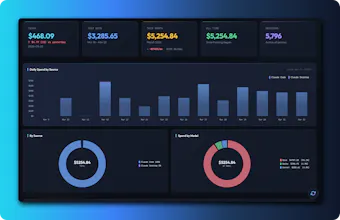
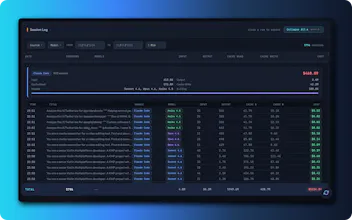
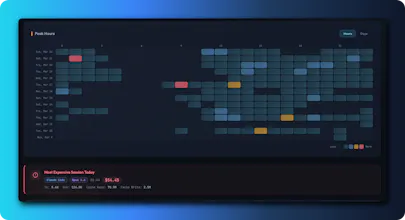
No single place shows your total Claude spend across tools. If you use Cursor, Claude Code CLI, Windsurf, Cline, or others — each burns tokens separately and you're flying blind. Claude Usage Tracker auto-detects 9+ tools, scans local session data, and shows everything in one dashboard: daily costs, model breakdowns, heatmaps, session logs, and monthly projections. Native macOS app or browser mode for other OS device. No cloud, no accounts, no telemetry. 100% free and open source (MIT).
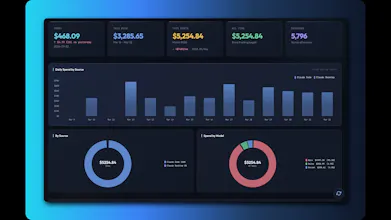


congrats! do you track per-query or per-prompt cost? we use it across cursor, clay and claude desktop and would like to know what are our most costly use-cases and if we can optimize use by switching models for our most expensive workflows, right now everything pretty much uses opus 4.x
@chintant Thanks! It tracks per-session cost with full model and token breakdowns, so you can see exactly which sessions are burning through Opus. That makes it easy to spot workflows where Sonnet would do the job just as well - those swaps can cut costs significantly. Give it a try and see where the spend is going!
@stevie_658jjh Have you considered adding projections for cache savings, since those can swing costs big time?
@swati_paliwal That's a great idea! Showing something like "You spent $50 but caching saved you $120" would really put the impact in perspective. The data is already there - just need to surface it. Adding to the roadmap, thanks!
MacQuit
Really useful tool! I use Claude Code daily and the costs do add up without you noticing. Having the per-model breakdown is great since I switch between Opus and Sonnet depending on the task.
One thing I'm curious about: how does it handle the difference between Pro subscription usage and direct API token pricing? For example, Claude Code through the Pro plan has a different cost structure than direct API usage. Does the tracker account for that, or is it purely based on API token rates?
The heatmap is a nice touch too. Would love to see time-of-day patterns in my own usage.
@lzhgus Thanks!
The tracker calculates costs purely based on API token rates. For Pro/Max subscribers, the numbers represent what your usage would cost at API pricing, not what you're actually paying. This is still useful though - it shows your consumption patterns and helps you see the value you're getting from your subscription. If the tracker shows $400+ in API-equivalent usage on a $200 Max plan, you know you're getting your money's worth. Enjoy the heatmap!
Oh I needed this yesterday! I use Claude Code and Cursor every day and it sounds very useful. The heatmap feature is great too - I bet I'll see a pattern of my late night coding sessions. Does it track token usage retroactively from existing session data, or does it only start counting from when you install it?
@ben_gend Thanks so much! And yes, the heatmap is great for exactly that, you'll definitely spot those late-night patterns (guilty here too).
It works retroactively! The app scans the existing JSONL and log files that Claude Code, Cursor, and other tools already store on your machine (e.g. ~/.claude/projects/, ~/.cursor/, etc.). So the moment you open it, you'll see your full usage history - no need to wait for new data to accumulate.
It also uses the actual timestamps from those session files, so your heatmap and cost breakdown will be accurate all the way back. Give it a try and let me know how it goes!
This is the tool I didn't know I needed. I've been using Claude Code and Cursor side by side for months and had zero visibility into which one was actually eating my budget. Just "oh the bill went up" with no idea why.
The per-model breakdown is really useful too. I bet most people don't realize how much they're spending on Opus vs Sonnet calls. Does it show per-project breakdowns or just overall?
@mihir_kanzariya Thanks! That "oh the bill went up" feeling is exactly why I built this. Right now it shows per-source (Claude Code vs Cursor etc.) and per-model breakdowns, so you can see exactly where the spend is going. Per-project breakdown isn't visualized yet but it's on the roadmap. Give it a try!
@stevie_658jjh how accurate is the cost calculation across different tools? Have you validated it against actual billing from Anthropic?
@denious Good question! The costs are calculated using Anthropic's published per-token API pricing, applied to the token counts logged by each tool. For API users, it should closely match your actual bill. For subscription plans (Pro/Max), the numbers represent API-equivalent cost - basically what your usage would cost at pay-per-token rates, which is useful for understanding your consumption. If you spot any discrepancies with your actual API bill, definitely let me know - happy to investigate!
Nice work, useful tool.
Two questions, Question 1. Are you going to make a PC version? Question 2. background - I am thinking about developing an AI assistant for my program (desktop crypto tax calculator). the question - would your tool be able to track AI token use from any user using my program? Probably, your answer will be not at the moment but it's possible yes.
@robert_vassov Thank you!
1. The native app is macOS only for now, but you can already use it on any OS (including Windows) via browser mode with just Node.js. A proper Windows app is on the roadmap.
2. You're right, not at the moment. The tracker currently reads local session logs from known tools (Claude Code, Cursor, etc.). But if your AI assistant uses the Anthropic API and logs token usage in a structured format, it would be possible to add as a custom source. Happy to chat more about that if you go down that path!