
Launched this week

Domscribe
Give your AI coding agent eyes on your running frontend
78 followers
Give your AI coding agent eyes on your running frontend
78 followers
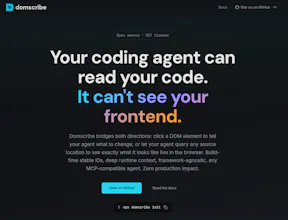
AI coding agents edit your files blind; they can't see your running frontend. Domscribe closes the gap. Code → UI: Query any source location via MCP, get back live DOM, props, and state. No screenshots, no guessing. UI → Code: Click any element, describe what you want in plain English. Domscribe resolves the exact file:line:col and your agent edits it. Build-time stable IDs. React, Vue, Next.js, Nuxt. Vite, Webpack, Turbopack. Any coding agent. MIT licensed. Zero production impact.



the stable ID approach is what makes this actually useful long-term. agents guessing CSS selectors based on snapshots is brittle - they break on any refactor. connecting to the running DOM state via MCP is the right layer. does it handle shadow DOM components or is that still a gap?
Domscribe
@mykola_kondratiuk Really appreciate this comment Mykola, you nailed exactly why I went with build-time IDs. Selector-based approaches break the moment someone renames a class or restructures a component; I wanted something that survives refactors by design.
On shadow DOM: it depends on which layer you're asking about.
The overlay itself runs inside shadow DOM (Lit web components) specifically so it doesn't interfere with your app's styles or DOM. So Domscribe is already using shadow DOM internally.
For your app's components: if you're using React or Vue components that happen to render inside a shadow root, the runtime adapters (fiber walking / VNode inspection) will capture props and state at the component level as normal, since those operate on the framework's internal tree, not the DOM directly.
Where it gets tricky is native web components (Lit, Stencil, vanilla custom elements) with their own template syntax. The build-time transform layer would need a new parser; but that's a clean integration. The injector is fully parser-agnostic: the Acorn, Babel, and Vue SFC parsers are all just implementations of a ParserInterface, and the injector handles all the ID generation, attribute injection, and manifest writing without knowing which parser produced the AST. A Lit tagged template parser would implement that same interface, and everything downstream (element tracking, context capture, the relay, MCP tools) works automatically.
It's not supported today but it's a single parser implementation away, not a rethink. Would love to hear more about your setup if you're working with shadow DOM heavily.
makes sense. shadow DOM support is probably the next hard problem - web components are everywhere now and most agents still can't reliably target inside them.
Domscribe
Hey Product Hunt! 👋
I built Domscribe because of a problem that kept bugging me: every time I asked an AI coding agent to change something on the frontend, it would burn through thousands of tokens just searching for the right file. Grep through the codebase, read a dozen candidates, build up context on each one, ask me to confirm; all before writing a single line of code. Most of the agent's time and token budget was spent on search, not on the actual edit.
Domscribe bridges that gap in both directions:
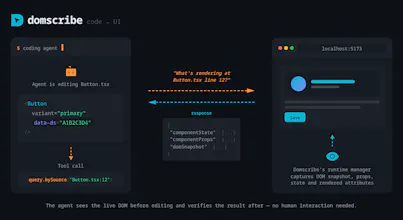
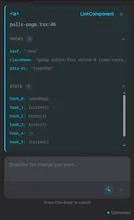
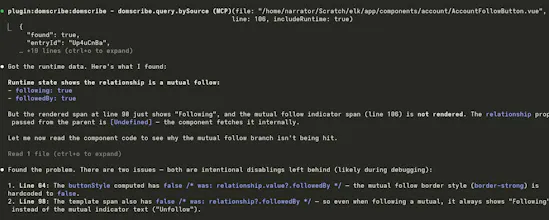
→ Code to UI: Your agent calls an MCP tool with a file and line number and instantly gets back the live DOM snapshot, component props, and state — no screenshots or human intervention needed.
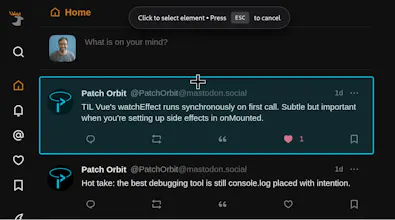
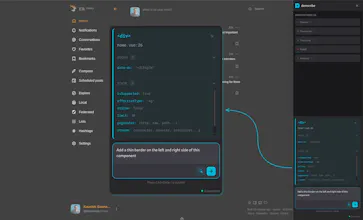
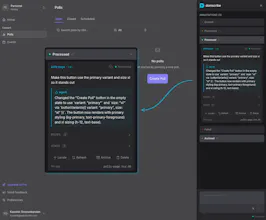
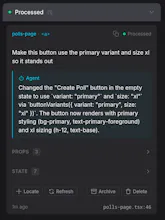
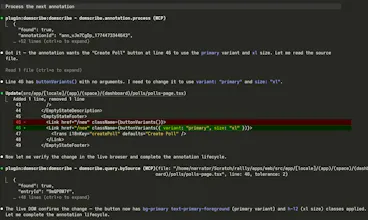
→ UI to Code: You click an element in the browser overlay, type "make this button blue," and submit. Domscribe resolves the exact source location and your agent edits the right file on the first try.
See demo videos on the website.
One thing I'm particularly proud of is the architecture. I spent a lot of time making sure Domscribe wasn't just a tool that works: it's a platform you can build on. The system is split into clean layers: a parser-agnostic AST transform handles ID injection, a generic manifest maps IDs to source locations, and a FrameworkAdapter interface defines exactly what a runtime adapter needs to implement. If you're using Svelte, Solid, Angular, or something entirely custom, you can write an adapter that plugs directly into the existing pipeline and everything else (element tracking, PII redaction, the relay, MCP tools, the overlay) just works. Next.js, React, Vue and Nuxt.js ship as first-party adapters built on the same public interface that any community contributor would use. No special internals or escape hatches:
Next.js adapter: @domscribe/next
Nuxt adapter: @domscribe/nuxt
React adapter: @domscribe/react
Vue adapter: @domscribe/vue
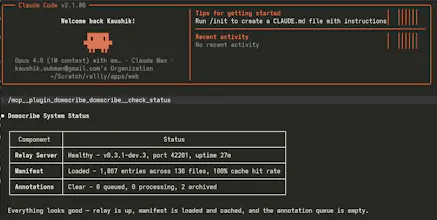
The same philosophy extends to the agent side. Domscribe exposes its full tool surface via MCP, so any compatible agent works out of the box. But I also built first-party plugins for Claude Code, GitHub Copilot CLI, Gemini CLI, and Cursor; each bundles the MCP config and a skill file that teaches the agent how to use Domscribe's tools effectively. Install the plugin and you're up and running in seconds, no manual config needed:
Claude code plugin
Gemini CLI extension
Cursor plugin
GitHub Copilot plugin
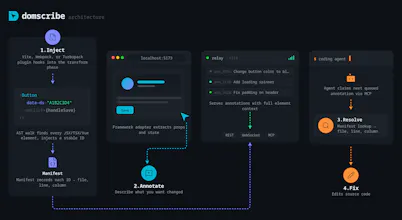
Under the hood it works at build time: an AST transform assigns every JSX/Vue element a stable ID via xxhash64 hashing and writes a manifest mapping each ID to its file, line, and column. At runtime, framework adapters walk React fibers and Vue VNodes to capture live props and state. A local relay daemon connects the browser and your agent via REST, WebSocket, and MCP stdio.
It's fully open source (MIT), framework-agnostic (React, Vue, Next.js, Nuxt), works across bundlers (Vite, Webpack, Turbopack), and supports any MCP-compatible agent (Claude Code, Cursor, GitHub Copilot, Gemini CLI, Kiro). PII is auto-redacted, and everything is stripped in production builds — zero runtime cost.
Would love to hear your feedback. What's your biggest pain point when using AI agents for frontend work?
Congrats on launch and thanks for contributing with the MIT license, always appreciated!
A question: Would it work on canvas based objects, e.g. I have a button made with canvas and I tag it on the canvas area. What about svg objects?
Domscribe
@yodalr Thanks Lennart, really appreciate that!
Great question. SVG elements are regular DOM nodes, so Domscribe instruments them the same way as any other element. Each <rect>, <path>, <g>, etc. gets a data-ds ID mapped to its source location, and the runtime captures props and state from the parent component. So if you have an SVG button built from a <g> with some <rect> and <text> children in a React or Vue component, clicking any of those in the overlay resolves to the exact file and line.
Canvas is a different story. Everything drawn on a <canvas> exists as pixels, not as DOM nodes, so there's nothing for Domscribe to attach an ID to. The <canvas> element itself would get instrumented, but the individual objects drawn inside it wouldn't. That's a fundamental limitation of how canvas works rather than something specific to Domscribe; any DOM-based tool hits the same wall.
That said, if your canvas buttons are wrapped in React/Vue components (which they usually are for event handling), Domscribe would still resolve the component and give your agent the props, state, and source location; you'd just lose the per-shape granularity you'd get with SVG.
Short answer: use SVG if you can, and you'll get full Domscribe coverage.
Letting AI coding agents see the running frontend rather than just the code is a sensible idea. In hardware-adjacent software work, the visual output matters as much as the logic, and right now agents have no way to verify that the UI actually renders correctly. What browsers does Domscribe support for the visual capture? What about the rendering on smartphones?
Domscribe
@anoop_jayan Thanks Anoop! One clarification: Domscribe doesn't do visual capture in the screenshot sense. It captures the actual DOM state, component props, and component state directly from the framework's internals (React fiber tree, Vue VNode hierarchy). So the agent gets structured data like "this button has className='btn-secondary', variant='primary' prop, and two pieces of hook state" rather than a screenshot it has to interpret. That's what makes it more reliable than image-based approaches.
On browser support: it works in any modern browser. The overlay is built with Lit web components and the runtime uses standard APIs (MutationObserver, WebSocket, DOM queries). There's nothing browser-specific in the implementation.
On smartphones: Domscribe is a dev-time tool that connects to a localhost relay, so it's designed for desktop development workflows. If you're debugging how a component behaves at mobile viewport sizes, you'd use your browser's responsive mode and Domscribe would capture the runtime state the same way. But on-device mobile debugging isn't something it's built for today.
How does the AST transform handle dynamically rendered components or conditional JSX that only mounts at runtime? Really impressive architecture, congrats!
Domscribe
@borrellr_ Thanks Ignacio! The transform runs at build time on the static AST, so every element in your source gets an ID injected; regardless of whether it's behind a ternary, an && guard, a switch, or wrapped in a Suspense boundary. The ID is there in the code waiting to be rendered.
At runtime, the element only shows up in the DOM (and becomes queryable for live props/state) when it actually mounts. So if an agent queries a source location for a conditionally rendered component that isn't currently visible, Domscribe returns the source mapping from the manifest but flags it as not currently rendered, and suggests navigating to a state where it mounts.
The short version: the manifest knows about everything in source, the runtime captures whatever is actually in the DOM right now.
This looks really cool, I will definitely need to try it after launch day. I have found that agents can get stuck on loops especially on the frontend trying to get the agent to change the right part or graph.
Domscribe
@carl_preconfin Thanks Carl! Yeah, that loop is exactly the problem - the agent spends most of its energy just figuring out where to make the change. Domscribe short-circuits that by giving the agent a direct lookup instead of a search. Would love to hear how it works for you once you try it out.
The no-screenshots approach is the right call. Giving agents access to actual runtime state instead of image interpretation is faster and actually accurate. Curious how it handles components that are conditionally rendered or lazy-loaded - those are the ones screenshot tools miss and where bugs hide. If you want real users finding those edge cases right now, we built a free community stress-testing tool called VibeFix Playground. Post your URL, people try to break it, reports come in with screenshots.
Domscribe
@onryo_builds Good question on conditional rendering and lazy loading. The manifest is built at transform time from the AST, so every element that exists in source gets an ID regardless of whether it's currently rendered. When the agent queries a source location via domscribe.query.bySource, the response includes a "rendered" boolean; if the element exists in the manifest but isn't in the DOM right now (behind a conditional, not yet lazy-loaded, on a different route), the agent gets the source mapping back but the runtime section tells it the element isn't currently visible. The hint system then suggests the user navigate to a page that renders that component and retry. So the mapping is always there. The runtime context is just conditional on the element actually being in the DOM.