Launched this week

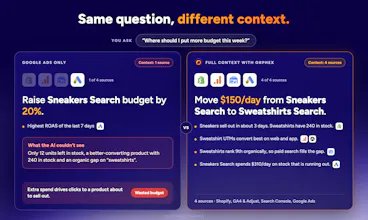
Orphex is the unified MCP gateway for digital marketing teams, handling auth and integrations for 65+ platforms, from Google Ads to Shopify, to give your AI true cross-channel context. Move your AI beyond QA: empower it to analyze integrated performance and take every action a human marketer can. Reallocate budgets, pause unprofitable creatives, or adjust products from a single prompt. Every change is logged and protected by safety guardrails. Start free, 30% off the first month.





Free
Launch Team / Built With


Customer.ioAutomate Messaging Everywhere — Startups Get 12 Months Free
Promoted
Congrats on the launch. Are there sample system prompts you recommend for first time Claude users?
@hikmet_topak Thanks! You don’t need a system prompt. Orphex ships with a built-in library of 100+ guides and skills, and Claude picks the right one from how you phrase your question. They cover analysis methods (diagnosing a ROAS drop, spotting creative fatigue, getting oriented in a new account, weekly health checks), step-by-step procedures for changes (budget updates, negative keywords, campaign creation), and the rules behind every number: attribution, aggregation and currency. There are also ready-made routines, like a pre-Black Friday check of tracking, feeds and campaigns, plus a live watch during the sale.
Your team can add its own entries too, like client rules, targets and brand notes, and Claude applies them automatically. So just talk to it like an analyst. Good first questions:
“Get me oriented: what’s connected here and how is this account set up?”
“Why did our ROAS drop last week?”
“Are any of our creatives fatigued?”
“Compare Meta and Google for the last 30 days, and explain why their conversion numbers differ.”
“Are our campaigns and tracking ready for Black Friday?”
LinkedIn usually restricts accounts that use AI agents. Can it trigger a LinkedIn account restriction?
@busmark_w_nika No, because Orphex doesn’t automate your LinkedIn account. LinkedIn restricts tools that drive the LinkedIn website like a bot: scraping, auto-connecting, auto-messaging. We do none of that.
Orphex connects through LinkedIn’s official Marketing API. You authorize it on LinkedIn’s own OAuth screen and grant ad-account permissions. It reads your campaign performance through the same API that LinkedIn’s approved ad-management partners use. It never logs in as you, never touches your profile, feed or inbox, and never posts or sends messages.
Can Orphex generate high-level quarterly trend slide decks ready for executive presentation?
@abilalzengin Yes. Ask your AI assistant something like “build a Q3 executive deck on our paid media trends” and it pulls the quarter’s numbers from your connected platforms, then builds a Google Slides deck right in your own Drive: headline trends, quarter-over-quarter changes, charts and the key takeaways. You can start from your company’s own template so it’s on-brand, and since it’s a regular Slides file, your team can edit, comment on and share it, or export it to PowerPoint or PDF!
Congrats to Kıvanç and the entire Orphex team on the launch! Can Orphex help teams identify underperforming campaigns across different ad platforms and suggest where budgets could be better allocated?
@kubra_yar Thank you! Yes. Because Orphex pulls every platform into one context, you can ask “Which campaigns are underperforming across Meta, Google and TikTok etc this month, and where should budget move?” and get one ranked answer on a common basis (spend, conversions, CPA, ROAS), instead of comparing four dashboards. Orphex also flags issues it detects in your accounts on its own, and its built-in guides help diagnose why something underperforms: a real performance drop, creative fatigue, a pacing problem, or a tracking or attribution change.
From there, it can propose the reallocation itself: lower budget here, raise it there. Each change is previewed against your guardrails and only applied once you approve it. Afterwards, Impact Analysis can measure whether the shift actually drove incremental results.
Congratz, a quick question. Can developers inspect the raw API payload before confirming a proposal?
@hakan_cadirci Thanks! Yes, with one nuance. Every proposal comes back as a structured preview before anything runs: the target’s current value read live from the platform, the exact values that will be sent, the guardrail verdict, and the account and currency it applies to. The proposal itself is plain JSON in the tool call, so developers see exactly what was asked for.
The confirm token is cryptographically bound to that preview. What executes is exactly what you approved, and if anything changed in between, the confirm is refused. For some platforms the preview also includes the native request body, and where the platform supports it (Google Ads, for example), the change is validated by the platform itself before you confirm. For other platforms you see the normalized fields rather than the raw HTTP request.
There’s also a readiness check for every action: it tells you whether a call would be accepted, and why not, without creating a proposal at all.
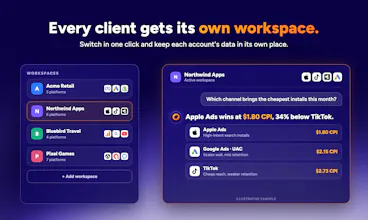
Congrats on the launch! If I connect all the accounts I have access to, is there any chance the data gets mixed up between them?
Thanks @emre_firtana , good question! Orphex keeps data organized by workspace, and each connected account is read independently, so numbers from different accounts aren’t blended together. If you manage multiple brands, the healthiest setup is one workspace per brand, ensuring each workspace only touches that specific brand’s data. If you have several accounts on the same platform, any change must specify its target account, and nothing is applied until you approve the preview. Are you connecting accounts for one brand or several?
will your tool auto creates accounts in other platform in which we don't have an account or it can only access data for which we give login credentials ?
@harini_mukesh No, Orphex never creates accounts on platforms you don’t use, and it never asks for your passwords/credentials. You connect each platform yourself through its official sign-in (OAuth) screen, or with an API key you generate on platforms that work that way, and you grant only the permissions shown there.