
Theysaid is more than a survey, it's an opportunity to engage your customers, employees, donors, and etc. Training AI takes less than 1 min by pointing it to URL or internal doc. Your audience can answer and ask questions as if they are talking to you!
This is the 4th launch from Theysaid. View more

TheySaid 4.0
Launching today
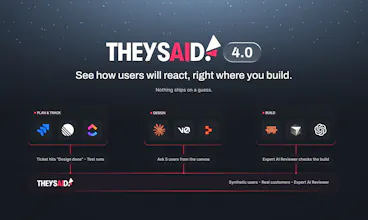
Put what you’re building in front of real customers or synthetic users trained on them when you need an answer in minutes without leaving Claude, Cursor, or Jira. Nothing ships on a guess.



Free Options
Launch Team / Built With


Framer AI AgentsDesign and publish professional sites with AI
Promoted


 Typeform
Hey Product Hunt 👋
I’m Chris, co-founder of TheySaid. Years ago I built the original UserTesting, so I’ve spent most of my career helping teams watch real people use their products.
Here’s what changed: your team now ships more decisions than ever (designs, tickets, PRs), but checking them with customers still means scheduling, recruiting, and waiting. So it gets skipped. We call the result Validation Debt: the cost of decisions you shipped without customer evidence.
TheySaid 4.0 lets you see how users will react, right where you build. Ask from Claude Design, v0, Replit, Bolt or Lovable, or have it run automatically when a Jira, Linear, ClickUp or Monday ticket finishes design. Then watch real people or synthetic users try what you just made.
What’s new:
Synthetic users: that actually use your product, on screen and out loud. Each starts from a model trained on 100,000+ hours of real usability sessions, then is tuned to your customers with the data you choose: call recordings, surveys, support tickets, CRM.
Audiences: define your real and synthetic customer groups once, and anyone in your org can reuse them.
MCP + Ticket Testing: feedback and a fix-it prompt inside your build tools, plus validation that triggers itself when design is done. No one has to remember to ask.
AI Companion: tell it what you need, and it does the work.
Experience Hub: always-on scoring of your critical customer experiences, with what to fix next.
Skills: reusable prompts for summaries, cohort analysis, and reports. Build it once. Run it forever.
Plus mobile app testing, clips and highlight reels, screeners, response quality monitoring, a unified test builder, a redesigned UI, and more.
Stop shipping decisions nobody validated. 🚫
Try 4.0 FREE → https://www.theysaid.io/v4
And tell me: when you build with AI today, how do you find out whether customers get it? Or do you skip that step?
@rukhsar_amjad thank you! and yes you can compare, that's actually how we'd suggest starting. in TheySaid every AI response is labeled synthetic, so you can run the same test with your real customers and AI testers in one study, then filter human vs synthetic and see the results side by side. and if an AI finding ever looks off you can flag it as inaccurate in one click, those flags go back into tuning the models. which kind of decision were you thinking of using it for?
@rukhsar_amjad Great question! I had the same question, which is why we've run several side-by-side studies comparing real humans with synthetic testers.
We tested with humans first, then used their recorded behavior and decision-making to create synthetic twins and compare the results. In our Shark vs. Dyson study, 84% of synthetic twins made the same brand choice as their human counterparts.
It's been a learning process. We initially found AI very effective at identifying usability issues, comparing features, and shopping like a real buyer. Personal preferences and emotional decisions were harder to replicate, but we've made a lot of progress through repeated studies. That's also why we're building next, our reusable digital twin feature, to capture those deeper individual preferences and behaviors.
I don't believe synthetic feedback should replace human feedback. The goal is to understand when to trust AI, when we still need humans, and how to combine both for better decisions.
Here's our published study: https://www.theysaid.io/human-vs-synthetic-testers
@rukhsar_amjad I'll second @lihong_hicken 's comment - Synthetic should never replace humans (in testing or IRL :) ). Running humans and synthetic side by side on your own product is the best way to build trust in it.
@rukhsar_amjad the truth is I could show you 100 studies that say you can use synthetic to make decisions, but you won't actually believe it until you try yourself. Our launch comes with free tests, so go give it a shot!
Very cool use of AI - we're pushing new features daily and getting a real user test on those is always tricky. Our current customers do bring up the issues they want fixed to begin with. Is there a way to tune TheySaid on a new customer audience that we're targeting rather than just our current customers? I.e., for a new feature that reaches a different niche? And if so, how would that type of tuning be done?
@justdan Love that you’re shipping daily! Yes, you can absolutely build an audience for a niche you’re not serving yet. When you set up a synthetic audience, you describe them in plain language: role, industry, company size, what they’re trying to accomplish, how skeptical they are of new tools, and what they already know. Then you fine-tune traits like patience and directness so you get a mix of testers, not just one persona.
Even better, launch a human panel test targeting your new niche audience, then build a synthetic audience from those responses. From there you can run both side by side in TheySaid and test every new feature against that audience as fast as you ship 🚀
@justdan one thing to add on top of Jaala's answer, since you ship daily. audiences are saved at the org level, not per project, so you set up the new niche once and anyone on the team can reuse it on every feature test after that. you can keep your current customer audience next to it and run the same feature against both, which is a nice way to see if the new niche trips on things your existing users never would. location is a setting too, if that niche is in a different market
@justdan Jaala and Arnab's comments are great, so if you get stuck, just holler. We tried to make it simple and intuitive to create your audiences, so if anything is difficult, let us know and we'll work on it.
Thanks @hamza_afzal_but! 🙌 Synthetic tests are quick. Exactly how long one takes depends on the length of your test: a short flow with a few tasks comes back fast, and longer tests with more steps take a bit more time. Here’s how it works:
Setup (about a minute): point TheySaid at your URL or prototype. You can also launch straight from Claude, Cursor, Figma, or a Jira/Linear/ClickUp ticket.
Test plan: the AI drafts the tasks and questions. You review, tweak if you want, and approve.
Run: the synthetic testers go through your flow in parallel.
Results: you get prioritized usability issues with fix prompts you can paste directly. If you launched from a ticket, they’re posted back to that ticket.
Grab the 10 free synthetic tests and let us know how long yours takes!
@hamza_afzal_butt you're going to love MCP! Go into Claude --> Settings --> Connectors. Search for TheySaid and you'll be able to connect your account.
Then as you're vibe coding or using Claude design, you can just launch your tests in the background as you continue working.
Tests usually run in 5-30 minutes, depending on how complex your product is.
@hamza_afzal_butt adding some real numbers to Chris's 5-30 min. i pulled our last 30 days of AI tester sessions and the median one runs about 10 minutes, most land somewhere between 5 and 18. the spread is mostly how much there is to explore, a signup flow is quick, a full shopping journey where the tester compares products and reads reviews takes a lot longer. and since they all run at once and you're not watching it live, it's usually a "kick it off, grab a coffee" thing
@chrishicken @hamza_afzal_butt Haha, I hate to give the classic “it depends” answer, but it really does! 😂
For synthetic surveys or interviews, usually just 1–2 minutes. For usability tests with screen recordings, around 15–30 minutes, depending on the task. AI testers often take longer than humans because they explore more thoroughly.
But here's my favorite part: You can build something in Cursor, Claude, or Replit in the morning, launch a test with real humans or your saved AI Audience (including digital twins of real customers), and go grab lunch. By the time you're back, the feedback is ready!
Fix what didn't work, build again in the afternoon, and run another test. directly in where you build. I've personally gone through two to three rounds of validation in a single day!
That's the future I'm excited about: build fast, validate fast, and make sure you're building the RIGHT thing. 🚀
Seeing synthetic users actually go through the product is pretty cool. It’s one thing to ask AI for feedback, but another to see where people might get stuck. Congrats on the launch!
@henry_habib thanks Henry! yeah that was the whole point for us. a model reviewing a screenshot will happily tell you the page looks fine, but once a tester actually has to click through, fill the form and get to the end, you see the exact spot where it hesitates or goes back. and you get it as a screen recording with them talking out loud, so you can just watch the moment instead of reading a summary. what are you building right now?
@henry_habib yes! We're the first company in the world to bring offer synthetic agents that record their screen and voice as they do tasks on your app, prototype, claude design, product or website. I think you'll be blown away by what you can do with synthetic.
@henry_habib Great minds think alike! 😂 I actually love watching the videos myself, even though we have an AI companion that can analyze the sessions, slice and dice the findings, and generate beautiful reports in seconds.
There's just something about watching someone experience a product you've built through fresh eyes, whether it's a real human or a synthetic tester. You catch little moments and reactions that a report can't fully capture.
Sometimes I find myself watching the videos just because it's so fascinating! 😂 Thanks for the support! 🙌
Thanks@henry_habib ! Watching the exact moment someone hesitates is our favorite part too!
@chrishicken This is looks useful! Can it help small teams test Ideas without spending hours on user research?
@rohit62661 yes, small teams are honestly who we had in mind. the slow part of research is usually recruiting and scheduling, not the testing itself. here you point it at a url or a prototype, the AI drafts the tasks and questions, you approve, and a couple of AI testers click through it while you keep working. most sessions we've run in the last month came back in roughly 5 to 18 minutes. you can do the same with real people too when you want that extra confidence. what kind of idea are you trying to test?
Yes @rohit62661! You can get real feedback without blocking off a week for research. The 10 free synthetic tests are a great place to start.
@chrishicken @rohit62661 I'd argue that if you're a small team, you actually can't afford NOT to use AI-powered research tools! 😂
Small teams move fast because they have to, but moving fast in the wrong direction is expensive. Too often, teams skip validation because they don't have the time, budget, or headcount, and end up building something customers don't want.
Now you can use AI to recruit real users, test with synthetic users, and validate ideas while you're building. Build fast, but build the RIGHT thing.
With speed and cost no longer being major barriers, there's really no excuse to skip validation anymore!
@rohit62661 +1 to everything already mentioned. I would add that you'll get the most savings if you use MCP and launch your tests from wherever you're already building. For example if you go to Claude --> Settings --> Connectors, you'll see TheySaid listed. Once connected you can launch a test on something you're building in Claude, or anything else.
Hi, team congrats. very curious how Synthetic users get created? is there any metrics showing the accuracy of simulation?
@gavin_fgg0815 thanks Gavin! creation happens in three passes. first who they are (role, company, demographics, voice), then how they think, around 19 traits like patience, trust in tech, how direct they are and who they blame when something breaks, then how they behave and talk. you can describe the audience yourself or build testers straight from real people's sessions. then each one goes through your product in a real browser, thinking out loud while the screen records. on accuracy, we ran 25 real shoppers vs 25 AI testers each built from one of those people, same live amazon task, and 21 of 25 ended up with the same final choice as their human, with the overall split and confidence very close too. the white paper on our launch page has the full numbers
Great questions @gavin_fgg0815! Arnab covered how they’re built, so I’ll just add this: the best accuracy metric is your own product. What would you want to test?
@gavin_fgg0815 you can read a white paper we just published on this topic here:
https://www.theysaid.io/human-vs-synthetic-testers
Note: accuracy improves with context and data. Out of the box results will vary, but as you add more context and data for AI to work with, you can dramatically improve the accuracy of simulation.