Hey everyone,
I m Karan building GazeIQ.
We kept running into the same problem: We d spend hours designing an ad. It looked clean, well-balanced, and correct. Then we d launch it and realize people never even noticed the important part. This isn t random.
There s strong research behind how humans process visuals. Eye-tracking and even fMRI studies show that attention follows patterns driven by things like contrast, faces, gaze direction, and hierarchy. But most ad decisions are still based on intuition. Which means you only learn what worked after the budget is already spent.
So we asked a simple question: Can we test attention before launching an ad?





Hey everyone 👋
I’m Karan — maker of GazeIQ
I kept running into the same frustrating loop:
Design an ad → feel confident → launch it → …and then realize it didn’t perform.
Not because of targeting. But because people never noticed what actually mattered. And by then, the budget was already gone.
That’s why I built GazeIQ.
👉 What if you could test attention before spending money?
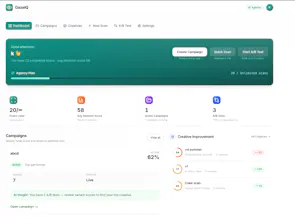
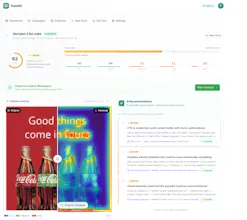
With GazeIQ, you can:
Upload any ad creative
See exactly where attention goes first
Get a simple Attention Score (0–100)
Fix weak spots before you launch
No more guessing. No more “this looks good to me.”
💡 The goal:
Catch weak creatives early — before they burn your budget.
Would genuinely love your feedback 🙏
What would make this a must-use for you?
Would you trust an attention score before launching?
What’s your biggest pain with ad creatives today?
Building this in public — your input would mean a lot 🚀
We're about to start running ads and this would have saved us a lot of wasted budget on creatives that "looked good" internally but nobody actually looked at the CTA. The attention heatmap is really clever - knowing where people's eyes go before you spend money is way better than A/B testing in production with real budget. The variant comparison feature is huge too, we always argue internally about which version to run and it usually comes down to whoever talks loudest. Does the model account for different platforms? Like attention patterns on an Instagram story vs a Meta feed ad vs a Google display banner are probably very different.
@ben_gend Hey, thank you so much for the kind words! You nailed exactly why we built this. Ending those internal "whoever talks loudest wins" debates and saving live ad budget are exactly what we're aiming for.
To answer your question: yes, we absolutely take that into account! but we are improving on it. We know that user behavior and visual attention patterns change drastically depending on where the ad lives. The model adjusts based on the format and platform you're designing for, so you get accurate heatmaps whether it's a fast-paced IG Story or a static Google display banner.
Good luck with your upcoming ad campaigns! We’d love to hear how the variant comparisons work out for your team once you start testing them.
The 'looks good' gut-check problem is real, I've been designing my App Store screenshots based on pure instinct and hoping for the best.
As an indie maker about to launch my first iOS app, could GazeIQ work for App Store creatives and screenshots, or is it primarily built for social media and display ads?
@misbah_abdel GazeIQ can actually be pretty useful for App Store screenshots too. It’s built more for ads, but the core idea is the same: are people looking at what you want them to look at?
For screenshots, it helps answer things like:
Is my headline actually the first thing people notice?
Are they focusing on the UI instead of the message?
Is the value prop clear or getting ignored?
App Store visuals are super make-or-break, so even small attention shifts can impact installs.
It’s not specifically designed for App Store yet, so you have to interpret it a bit yourself, but as a quick pre-launch check it’s honestly quite helpful. Especially when you’re testing multiple versions and don’t want to rely only on gut feel.
Tried this out recently and found it surprisingly useful.
What stood out was how it separates “looks good” from “actually guides attention.” A couple of creatives I thought were solid had key elements getting completely ignored.
The heatmap + score combo makes it easy to quickly sanity check before running ads. Feels more like a pre-launch filter rather than another analytics tool.
Curious to see how it performs across different industries and ad formats, but definitely feels like something marketers can plug into their workflow 👍
@akansha22 Really appreciate you trying it out and sharing this. That “looks good vs actually guides attention” gap is exactly what we kept running into as well.
Interesting that some key elements were getting ignored, we’ve seen the same pattern where the design feels right but the visual flow just doesn’t lead to the CTA or product.
Glad the heatmap + score combo felt useful. We’re aiming for it to be a quick pre-launch filter so teams can catch these issues before spending.
On the industry point, totally valid. We’re actively testing across different formats like Meta feed, stories, and display, and the behavior does shift quite a bit depending on context. Would love to hear how it performs for your use cases as you try more creatives.
This is interesting because most tools tell you what happened after the campaign.
This flips it to before you spend, which is where most of the waste actually happens.
I tried it on a couple of creatives and it was a bit eye-opening. Things that felt “clean” visually weren’t really guiding attention where I expected.
Feels especially useful for quick iterations when you’re testing multiple versions.
@anjali_garg3 Glad that resonated with you.
That shift from post-analysis to pre-launch validation is exactly what we’re trying to solve. Most of the waste happens before performance data even exists, but teams usually only realize it after spending.
Interesting that you noticed the “clean vs attention” gap. That’s been a consistent pattern. A lot of designs look polished but don’t actually guide the eye to the key message or CTA.
And yes, quick iteration is where it really shines. Instead of guessing between versions, you can filter out weak creatives early and move forward with more confidence.
Would love to hear how it performs for you across different formats as you test more